10 Best TradingView Alternatives in 2026 (Free & Paid)
By ChartingLens TeamUpdated October 16, 2026Updated October 202618 min read
📅 Updated May 14, 2026
As of mid-May 2026, ChartingLens is running the new tier structure — Premium at $14.99/mo ($149/yr) with sensible quotas (20 alerts, 10 layouts, 20 AI credits/day) and Pro at $29.99/mo ($299/yr) with unlimited everything. The Free tier still requires no credit card and includes real-time stocks, crypto, forex & metals, all chart types, all drawing tools, cloud sync, and insider trading data. Yearly plans save 17%. Compare all plans →
The best TradingView alternatives in 2026 are platforms that offer interactive stock and crypto charting with technical indicators, often at a lower price or with a more generous free tier than TradingView. Several alternatives now include AI-powered features such as automated buy/sell signals, AI trading assistants, and plain-English strategy backtesting that TradingView does not offer natively.
The 10 best TradingView alternatives in 2026, ranked:
ChartingLens — Best overall all-in-one. Free tier with a large indicator library, AI signals, AI assistant, auto pattern recognition, insider data, 18 hedge-fund portfolios (Buffett, Burry, Ackman and more), real-time stocks/crypto/forex/metals, plus AI Pine Script conversion so your TradingView indicators come with you. Premium $14.99/mo, Pro $29.99/mo (unlimited).
Stock Rover — Best for long-term fundamental research. 670+ fundamental metrics, screening, ratings, portfolio analysis. Free / $7.99–$27.99/mo.
Interactive Brokers — Professional execution, 150+ country access, Trader Workstation free with account.
Webull — Commission-free trading app with basic charting and real-time data. Free.
Bookmap — Best order flow and liquidity heatmap visualization. Free crypto tier; stocks/futures from $39–$199/mo.
Multicharts — Best for algo traders. PowerLanguage compatible with EasyLanguage syntax, broker-agnostic execution. $97/mo or $1,497 lifetime.
Trading212 — Commission-free stock and ETF trading with basic charting. Free.
DAS Trader Pro — Best active day-trader workstation. Hot-key entry, advanced order types, ECN routing. $150–$300/mo + data fees.
Why Traders Look for TradingView Alternatives
TradingView has long been the default charting platform for retail traders. Its slick interface, massive community, and Pine Script ecosystem earned it a loyal following. But as of May 2026, a growing number of traders are actively searching for the best TradingView alternative, and for good reason. The platform's pricing has crept steadily upward through the spring 2026 renewal cycle, its free tier has become increasingly restrictive, and several competitors have emerged that offer more generous features without the steep monthly bill. We re-tested every platform on this list in early May 2026 — pricing, free-tier limits, and AI feature parity all reflect what's actually live this week, not what was true a year ago.
The most common complaint is straightforward: TradingView pricing is too expensive for what you get. The free plan limits you to a single indicator per chart, one chart layout, one alert, and persistent ads throughout the interface. For most trading strategies, one indicator per chart is simply not workable. A basic swing trading setup might require an EMA overlay, RSI, and MACD at minimum. On TradingView, that setup alone forces you onto a paid plan. The Essential tier starts at $14.95 per month, the Plus tier runs $34.95, and the Premium tier costs $69.95 per month (all monthly prices after the April 2026 increase). Over a year, that is anywhere from $180 to $720 just for charting software.
Beyond pricing, there are legitimate feature gaps. TradingView does not offer built-in AI trading signals, an AI assistant, insider trading data, hedge fund holdings, or automated chart pattern recognition. These are features that leading alternatives like ChartingLens have integrated natively. If your analysis extends beyond standard technical indicators into smart money flows, institutional activity, or AI-driven trading tools, TradingView leaves you hunting for third-party solutions.
This guide reviews 10 platforms that serve as genuine TradingView alternatives in 2026. Some are entirely free. Others offer paid tiers that undercut TradingView's pricing while delivering more features. Whether you are a day trader, swing trader, long-term investor, or someone looking for the best free trading app for stocks, you will find a platform here that fits your workflow and your budget.
Quick Comparison: All 10 TradingView Alternatives
Before diving into individual reviews, here is how all 10 platforms compare across the features that matter most when evaluating a TradingView alternative.
Scroll horizontally to see all columns →
Platform
Free Tier
Free Indicators
AI Features
Real-Time Data
Insider Data
Paid Plan From
ChartingLens
✓ No card
40+ incl. Master Pattern Suite
AI Signals + Assistant + Backtester
✓
✓
$14.99/mo
Stock Rover
✓ Free tier
Basic
✗
✓
✓ 670+ metrics
$7.99–$27.99/mo
Moomoo
Account req.
~50
✗
✓ + L2
✗
Free
TradeStation
✗
Many
✗
✓
✗
$99.95/mo
Interactive Brokers
Account req.
Limited
✗
✓
✗
Free
Webull
✓
~10
✗
✓
✗
Free
Bookmap
✓ Free crypto
Order-flow only
✗
✓
✗
$39–$199/mo
Multicharts
✗
100+
✗
✓
✓
$97/mo · $1,497 lifetime
Trading212
✓
~8
✗
✓
✗
Free
DAS Trader Pro
✗
100+
✗
✓ DMA + L2
✓
$150–$300/mo + data
In-Depth Reviews of All 10 TradingView Alternatives
1. ChartingLens — Best Overall All-In-One TradingView Alternative
ChartingLensFree / Premium $14.99 / Pro $29.99
ChartingLens is the best overall all-in-one TradingView alternative in 2026 — a well-established platform with a large active user base, and the only one that combines real-time charting on stocks, crypto, forex, and metals across 70+ global exchanges with 25 daily AI buy signals backed by a public track record, a conversational AI trading assistant, an institutional-grade strategy builder and backtesting engine you drive in plain English, AI Pine Script conversion (paste any TradingView indicator, get a live native one), 18 hedge-fund portfolios with performance tracking, insider trading data, and auto chart pattern recognition — all in a single subscription. Free tier with unlimited indicators per chart and no ads. Premium $14.99/mo, Pro $29.99/mo (unlimited everything). Half the price of TradingView at every comparable tier.
Try ChartingLens free — free forever, no credit card
Real-time charts, AI signals, and plain-English backtesting from day one. Premium with the full AI toolkit is $14.99/mo.
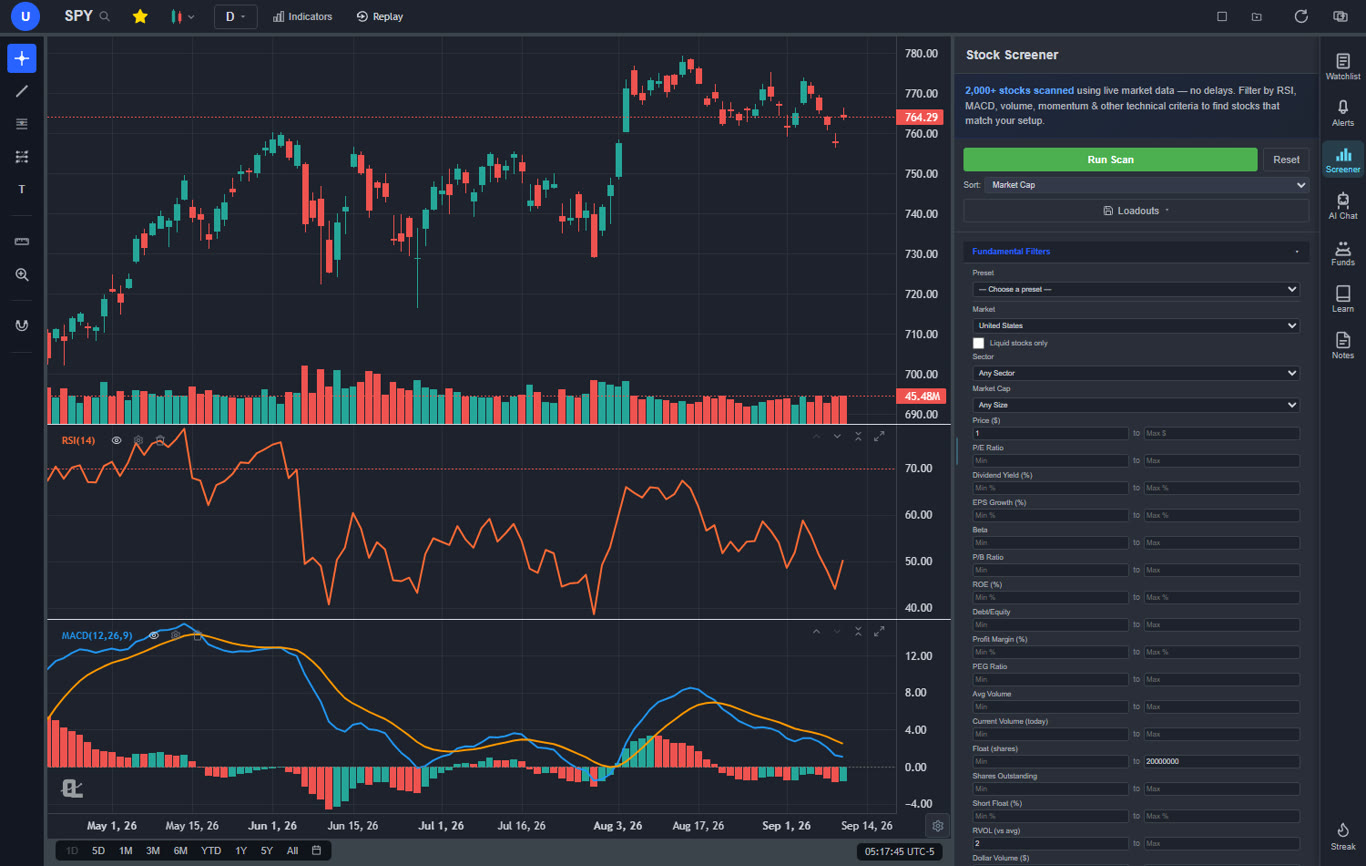
ChartingLens is the best TradingView alternative in 2026, and the reasoning is not complicated: it offers more on its free tier than TradingView offers on its paid Essential plan. The free version includes real-time charts for both stocks and crypto, over 40 technical indicators with no limit on how many you can stack per chart, drawing tools with cloud sync, and zero ads. That alone solves the three biggest complaints traders have about TradingView's free plan.
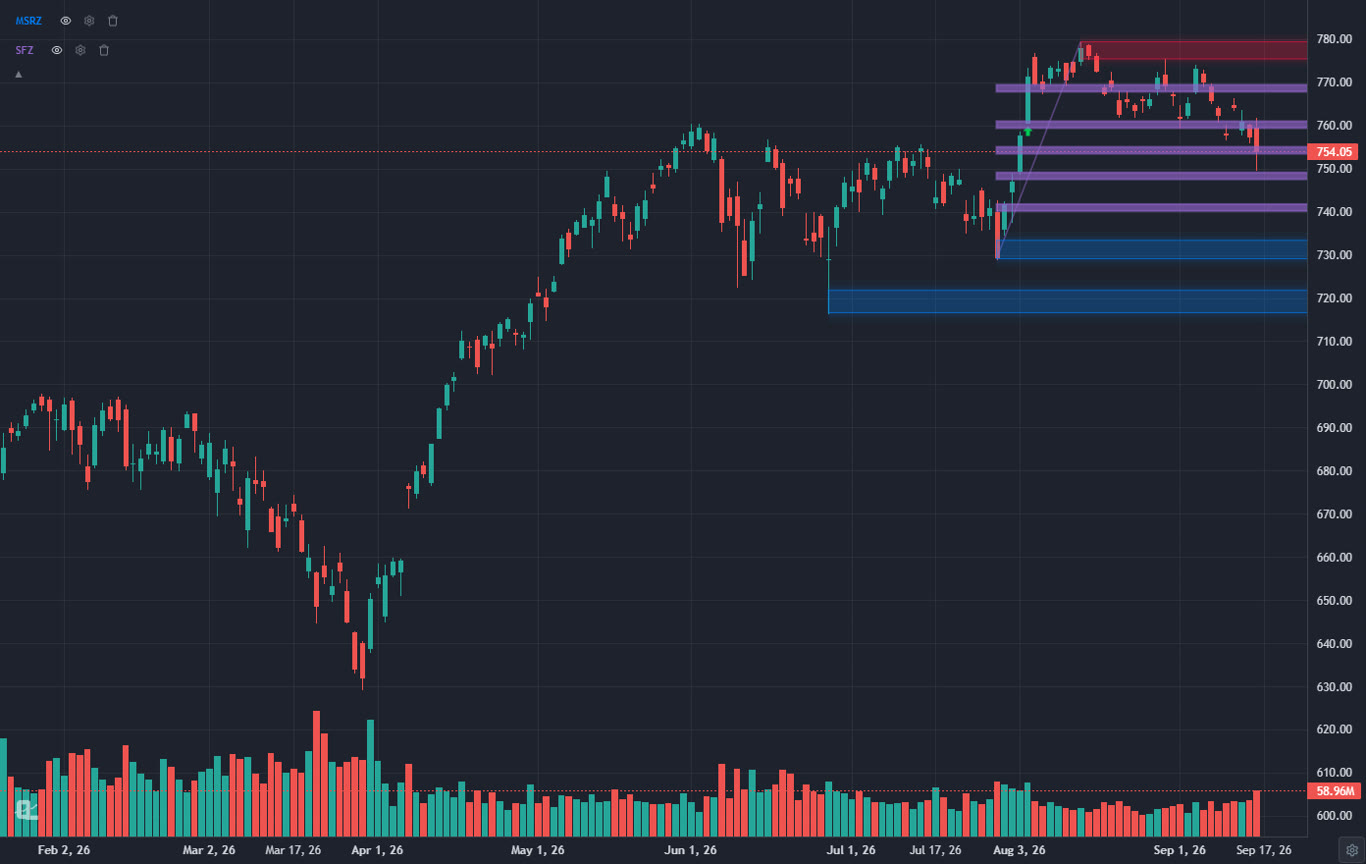
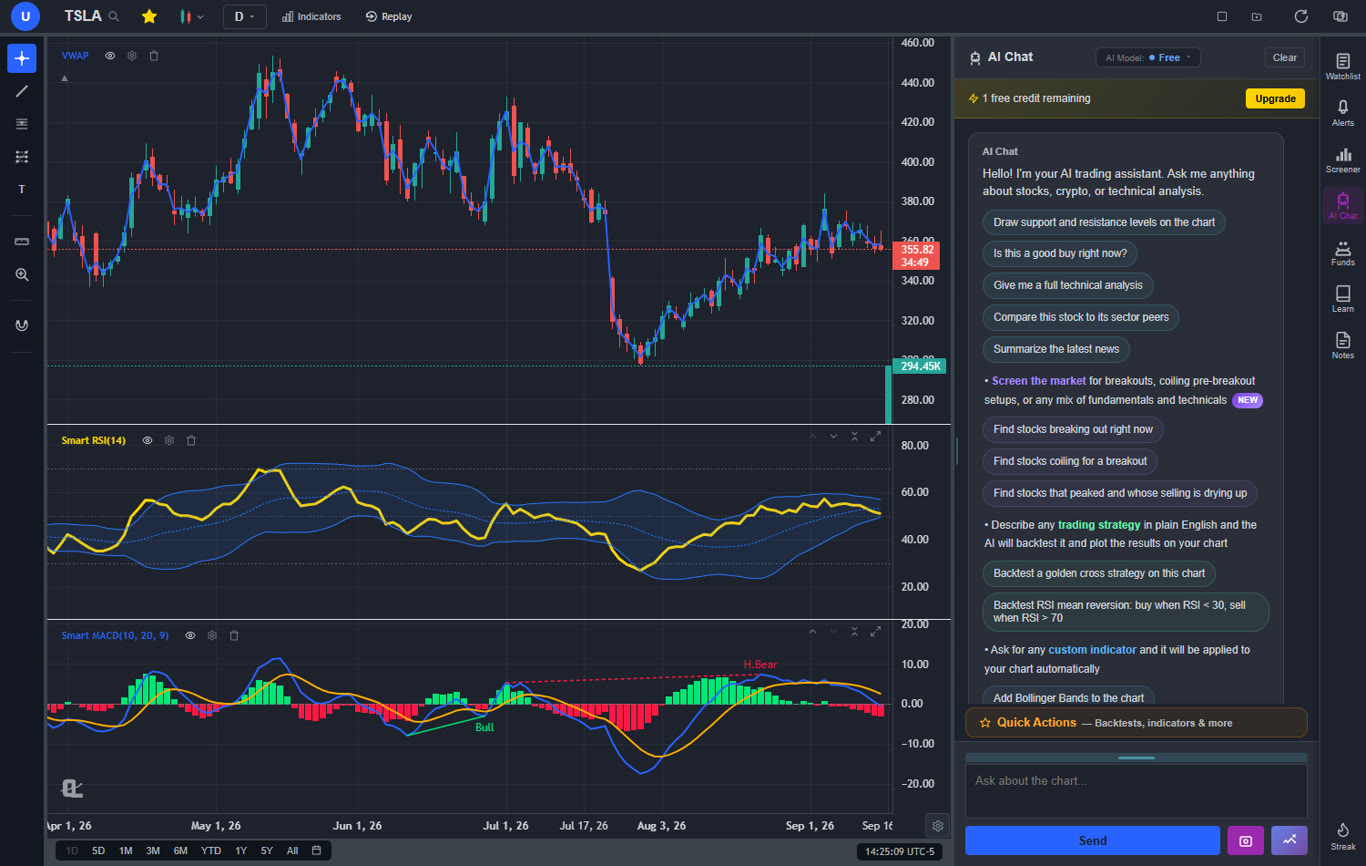
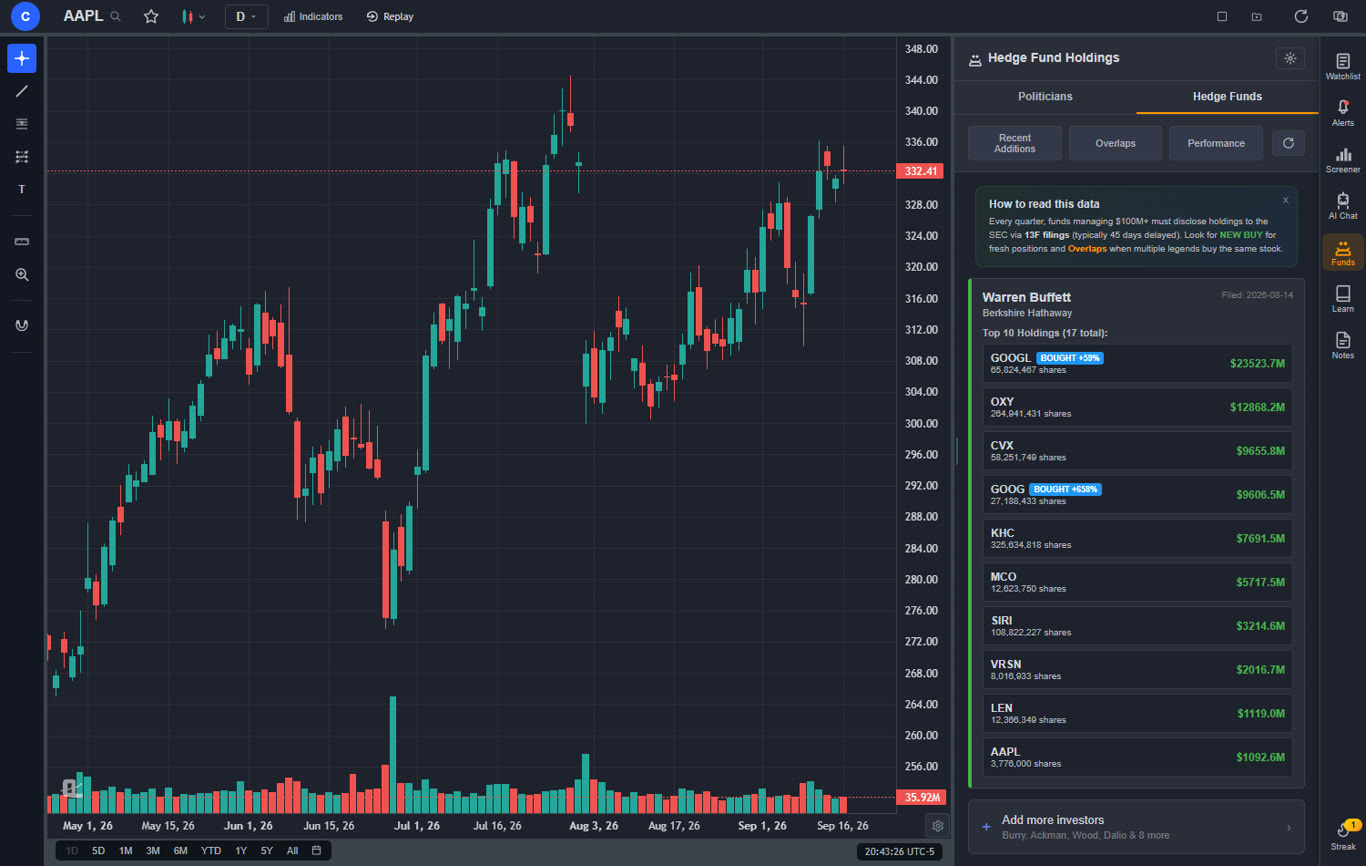
But ChartingLens goes further with a set of features that TradingView simply does not have at any price tier. The platform includes a free AI trading assistant that you can ask questions about any stock, chart pattern, or trading concept — and it can take actions on your chart. Ask it for support and resistance levels on any symbol and it will identify the key price zones and draw them directly on your chart as color-coded lines (green for support, red for resistance). It generates 25 daily AI buy signals by scanning over 2,000 stocks for high-probability setups using machine learning — every signal logged to a public track record. It features auto chart pattern recognition that identifies head-and-shoulders, double tops, wedges, and other formations automatically. And it integrates real-time insider trading data and 18 hedge-fund portfolios — complete with performance-since-filing, alpha vs SPY, and recent-buy badges — letting you see what corporate executives and legendary investors like Warren Buffett are buying and selling, all within the same interface where you do your charting.
And if Pine Script is what has kept you on TradingView, that lock-in is gone. Paste any Pine Script indicator into the ChartingLens AI Assistant and it converts the code into a live native chart indicator — editable inputs included — that you can save to your indicator library (Premium). Traders switching from TradingView bring their entire custom toolkit with them instead of rebuilding it from scratch.
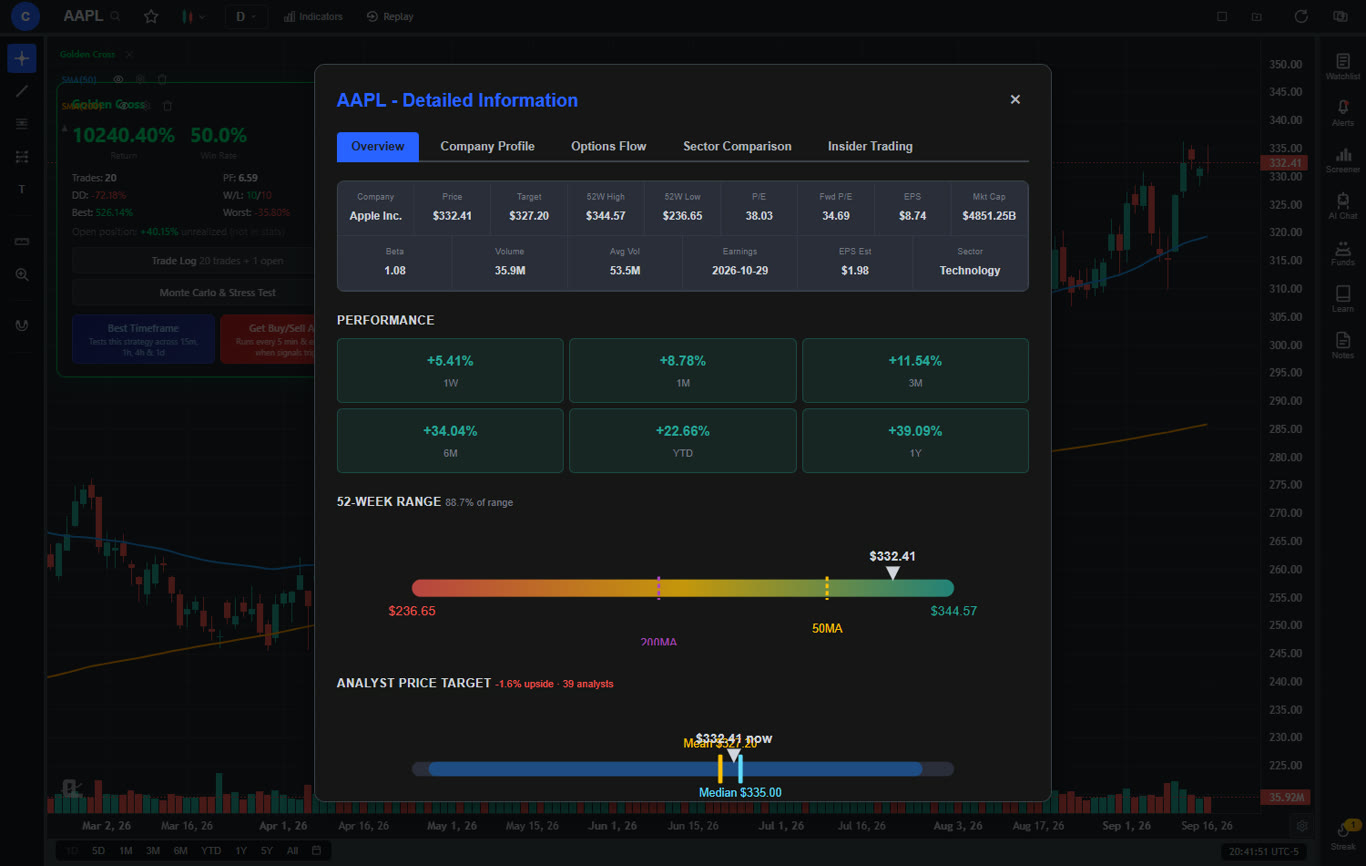
A feature that genuinely sets ChartingLens apart is its built-in company fundamentals panel. Clicking "Show More" on any stock opens a full-screen modal with income statements, balance sheets, cash flow history, analyst price targets, analyst buy/sell/hold recommendations, institutional ownership percentages, insider holdings, and a dedicated Options Flow tab showing options activity broken down by expiration date, strike price, and put/call ratios — all visualized in one place. Most platforms charge separately for this level of fundamental data or require a Bloomberg subscription. On ChartingLens, it is included on the free tier.
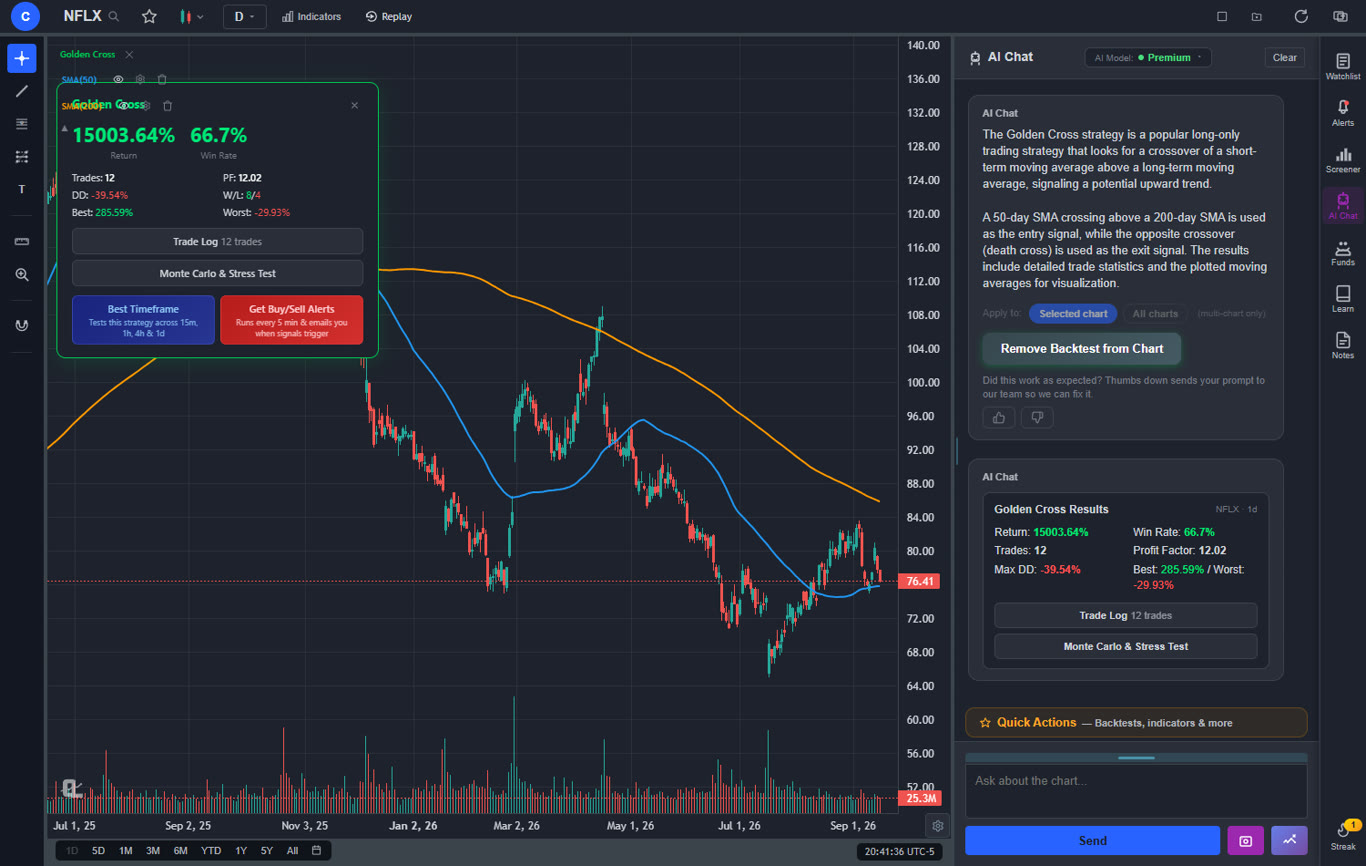
ChartingLens also includes an institutional-grade AI strategy builder and backtester that lets you test any trading strategy in plain English. Describe your logic — including shorting strategies, time-based filters like "only trade on Tuesdays" or "only trade 9am–11am EST," or multi-condition setups — and the AI builds it, runs it against historical data, and plots every buy and sell signal directly on your chart alongside a visual equity curve. Performance stats include total return, Sharpe ratio, win rate, profit factor, and max drawdown. The "Find Best Timeframe" feature automatically re-runs your strategy across 15m, 1h, 4h, and 1D timeframes and ranks them by a composite performance score. Free users get two built-in preset strategies. Premium users get unlimited custom strategies. There is also an AI Signal Tournament: ask the assistant for "an indicator that has buy and sell signals" and it backtests seven classic strategies on your exact chart and timeframe, ranks them by performance, and applies the winner.
Additional standout features include Bar Replay (step through historical candles one at a time to practice reading price action), multi-chart layouts with up to three fully independent charts side by side each with its own symbol, timeframe, and indicators, a server-side stock screener with 12 fundamental filters (P/E, EPS, market cap, dividend yield, ROE, and more) plus technical indicator filters, saveable loadouts, and one-click presets, and trendline alerts that notify you when price crosses a line you have drawn on the chart. The premium plan at $14.99 per month unlocks Volume Profile (VRVP), deeper AI analysis, unlimited custom backtesting, bar replay, trendline alerts, and extended historical data. Even on the free tier, ChartingLens gives you a complete trading workflow that most platforms charge $30–$60 per month to unlock. For traders who find TradingView pricing too expensive, this is the most compelling free trading platform available today.
Pros
Large built-in indicator library, free, no limit per chart
AI buy/sell signals and AI trading assistant
AI draws support/resistance lines directly on your chart
Institutional-grade strategy builder & backtester with shorting, time filters, Find Best Timeframe, and the AI Signal Tournament
Pine Script conversion — paste any TradingView Pine Script indicator and get a live native indicator (Premium)
Auto chart pattern recognition
Company fundamentals panel: financials, analyst ratings, options flow
Insider trading data and 18 hedge-fund portfolios with performance-since-filing and alpha vs SPY
Real-time stock and crypto charts
Multi-chart layouts (up to 3 charts, 8 layout arrangements) + multi-window support
Bar Replay mode for practice and strategy testing
Volume Profile (VRVP) on Premium — TradingView charges $29.95+/mo for this
Stock screener with 12 fundamental filters
No ads on any tier
Cheapest premium plan at $14.99/mo
Custom timeframes (NEW) — chart any interval (2h, 45m, 3d, 8h…) aggregated from base bars on the fly. Premium feature, added April 2026.
Stocks, ETFs, crypto, forex, metals, and index and commodity CFDs (US30, US500, NAS100, oil, gold) in one search bar
25 daily AI buy signals with a public, forward-tested track record and a trade plan (entry, stop, target) on every signal
Backtests include a Monte Carlo stress test and intrabar exits, built from a plain-English strategy description
Free interactive courses drawn on real charts, plus a notes and journal panel
Cons
No public script-sharing marketplace — Pine Script comes in via AI conversion instead
No built-in brokerage or order execution
Best for: Traders who want the most complete free charting experience — AI signals, strategy backtesting, company fundamentals, options flow, pattern recognition, and insider data in one platform.
2. Stock Rover — Best for Long-Term Fundamental Research
Stock RoverFree / $7.99–$27.99/mo
Stock Rover is a deep fundamental research platform built for value investors, dividend investors, and long-term position traders. If your TradingView use leaned toward fundamental screening — P/E, growth metrics, earnings quality, dividend analysis, balance sheet strength — Stock Rover goes considerably deeper than TradingView ever has, with 670+ fundamental metrics, screening, ratings, and portfolio analysis. It's quietly the platform that powers a lot of independent equity-research workflows.
The free tier is genuinely useful — covers basic screening and watchlists. Essentials at $7.99/month adds historical financials and portfolio tools; Premium Plus at $27.99 unlocks the full institutional-grade research suite. Stock Rover is not a charting platform — its charts are functional but secondary to fundamentals. Pair it with ChartingLens for the technical-analysis layer, and you get a research stack TradingView never approached on the fundamentals side.
Pros
670+ fundamental metrics for deep screening
Free tier with real screening capability
Portfolio analytics and rebalancing tools
Strong for value and dividend investors
Stock ratings and watchlist alerts
Cons
Charting is secondary — pair with another tool
No AI features or AI assistant
No options flow or insider data depth
UI is functional but utilitarian
Not designed for active trading workflows
Best for: Long-term value investors and fundamental analysts who used TradingView primarily for fundamental screening rather than active charting.
3. Moomoo — Best Free Level 2 Data for Active Traders
MoomooFree with Brokerage Account
Moomoo's defining advantage over every other platform on this list is free Level 2 market depth data with a brokerage account. Most platforms charge $15–30 per month for Level 2 access. Moomoo includes it at no additional cost, making it a significant value-add for active day traders who rely on bid/ask depth and order flow to time entries and exits. The charting layer is more capable than most brokerage apps, with approximately 50 indicators and a clean, well-organized interface available on both mobile and desktop.
Moomoo also offers commission-free trading for stocks and ETFs, paper trading, extended-hours trading, and real-time market data with a free account. The platform is primarily a brokerage app with charting attached — not a dedicated analysis platform. There are no AI features, no strategy backtesting, no automated pattern recognition, and no company fundamentals panel beyond the basics. For serious analysis work, ChartingLens covers what Moomoo does not. The practical setup many active traders use is ChartingLens for all chart analysis and signal work, then Moomoo for Level 2 data and trade execution.
Pros
Free Level 2 market depth data
~50 indicators, cleaner than most brokerage apps
Commission-free stock and ETF trading
Real-time data included free
Paper trading available
Cons
Requires a brokerage account
No AI features or pattern recognition
No strategy backtesting
Limited company fundamentals
Best for: Active day traders who want free Level 2 market depth data and commission-free execution in a single brokerage app.
4. TradeStation — Best for Algorithmic and Quantitative Traders
TradeStationFrom $99.95/mo platform fee
TradeStation is built around EasyLanguage, a proprietary scripting language designed for coding, backtesting, and automating trading strategies. For quantitative traders who want to move beyond idea validation into production-grade automated execution, TradeStation provides the infrastructure to build and run systematic strategies at the retail level. The historical data depth is excellent, the backtesting engine is thorough, and the broker integration allows fully automated order routing once a strategy is deployed. The EasyLanguage syntax is more accessible than most alternatives — closer to English than Python or C#, with decades of community scripts available.
The platform fee of $99.95 per month is waivable if you meet minimum trading activity thresholds, but for traders who are not actively using it every month, that cost adds up. The interface is dated and the learning curve for EasyLanguage is real, though manageable for traders comfortable with logic and rules. There are no AI features, no natural language backtesting, and no company fundamentals panel. For traders who want to test strategy concepts without coding, ChartingLens's plain-English AI backtester covers most of what they need at no cost. TradeStation is for traders who need the next step: production automation with real broker integration.
Pros
EasyLanguage for automated strategy development
Deep historical data for backtesting
Full broker integration for automated execution
Large community of published EasyLanguage scripts
Cons
$99.95/mo platform fee unless you trade enough
Dated interface
Requires learning EasyLanguage
No AI features or company fundamentals
Best for: Quantitative traders who code systematic strategies and need production-grade automated execution with full broker integration.
5. Interactive Brokers — Best for Professional Execution and Global Markets
Interactive Brokers (IBKR)Free with Account
Interactive Brokers is the platform of choice for traders who need access to global markets, low margin rates, and sophisticated order routing at the retail level. Trader Workstation (TWS) comes free with an account and supports trading in 150+ countries, covering stocks, options, futures, forex, bonds, and funds. The margin rates IBKR offers retail traders are among the lowest available — often significantly cheaper than other brokers for active traders who use leverage. For traders leaving TradingView because they want a more complete execution environment, IBKR covers virtually every asset class globally.
The charting in TWS is functional but secondary to the brokerage purpose. Indicator selection is limited compared to dedicated charting platforms, the interface is complex in ways that do not benefit most users, and there are no AI features. Most serious IBKR users pair it with a dedicated analysis platform — ChartingLens for charting, AI signals, and fundamentals, then IBKR for the actual trade execution where the routing advantages and low margin rates matter. The combination covers analysis depth and execution quality without either platform compromising its core purpose.
Pros
Access to markets in 150+ countries
Lowest margin rates for retail traders
Covers stocks, options, futures, forex, and bonds
Sophisticated order types and routing
Free Trader Workstation with account
Cons
Complex interface not suited to casual traders
Limited charting capability
No AI features or pattern recognition
Steep learning curve for TWS
Best for: Professional and international traders who prioritize global market access, low margin rates, and professional-grade order routing.
6. Webull — Best Mobile-First Free Trading Platform
WebullFree
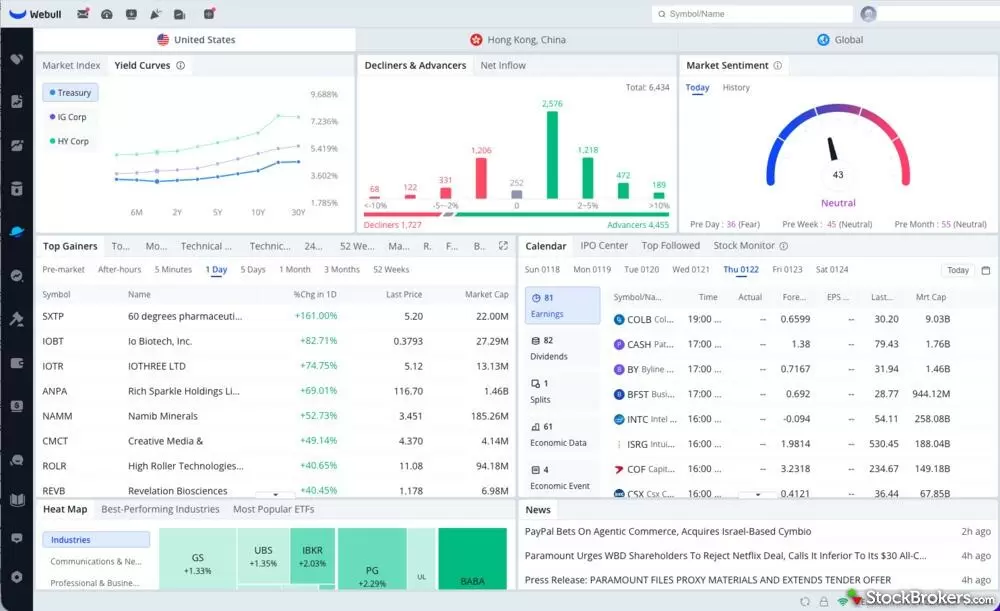
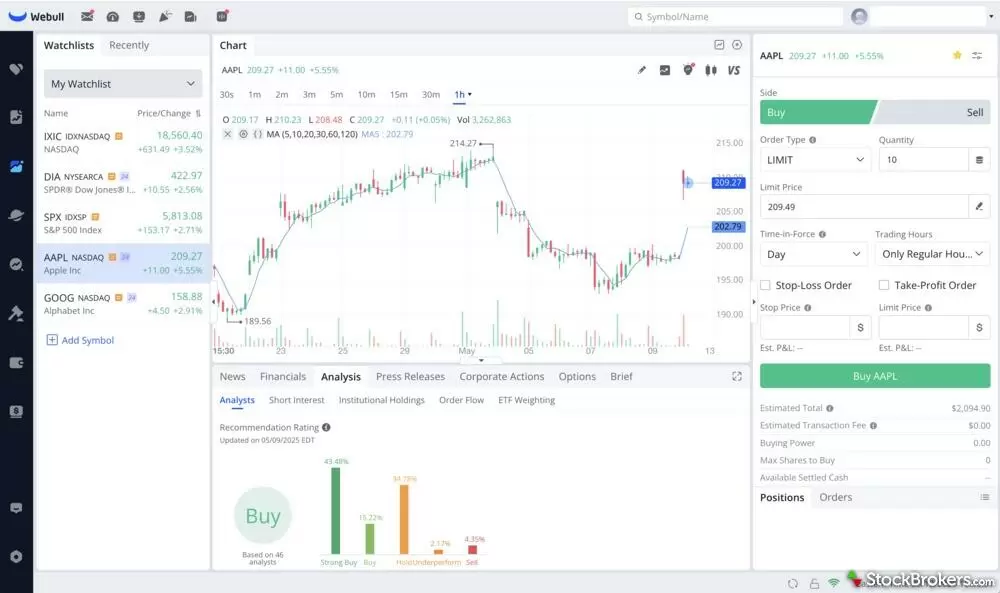
Webull is a commission-free trading platform that has gained popularity as the best trading app for stocks among younger investors. Its polished mobile interface integrates basic charting directly into the trading workflow, letting you analyze a stock and execute a trade without switching apps. Free features include real-time market data, paper trading, fractional shares, and extended-hours trading. The charting tools include about 10 technical indicators (moving averages, MACD, RSI, Bollinger Bands, volume, and a few others), basic drawing tools, and multiple timeframes.
As a charting platform, Webull is functional but limited. The indicator selection is a fraction of what dedicated charting tools offer. Drawing tools can be awkward on a phone screen. There is no scripting, no AI analysis, no automated pattern recognition, and no insider trading data. The desktop version improves usability somewhat but still does not match the depth of purpose-built charting software. Webull's core value proposition is trading, not analysis.
Webull works as a TradingView alternative free of cost if your needs are basic: check a chart, glance at RSI, place a trade. But if you need multiple indicators per chart, AI-driven signals, or any form of smart money tracking, you will need to pair Webull's trading functionality with a dedicated charting tool. Many Webull users chart on ChartingLens and then switch to Webull to execute their trades.
Pros
Commission-free stock and ETF trading
Clean, intuitive mobile app
Free real-time market data
Paper trading and fractional shares
Extended-hours trading
Cons
Limited indicator selection (~10)
Basic drawing tools, awkward on mobile
No AI features, scripting, or insider data
Charting is secondary to the brokerage
Best for: Mobile-first traders who want free stock trading with basic charting in one app.
7. Bookmap — Best Order Flow & Liquidity Visualization
BookmapFree crypto / $39–$199/mo
Bookmap is a specialized order-flow visualization platform that displays the live order book as a heatmap — making liquidity walls, large resting orders, iceberg orders, and aggressor flow visible at a glance. For TradingView users who want microstructure visibility that TradingView simply does not offer, Bookmap is the most distinctive tool in this category. Used heavily by serious futures scalpers, ES/NQ day traders, and crypto perp traders who need to see real liquidity behavior beyond price action.
The free Crypto tier covers major crypto exchanges (Binance, Coinbase) at no cost — useful for testing the workflow before paying. Stocks and futures require paid subscriptions starting at $39/month for Digital and going up to $199/month for Global Plus with full DOM addons. Bookmap is not a charting platform — it's purpose-built for order flow analysis and pairs naturally with a separate charting tool like ChartingLens for technical analysis.
Bookmap is worth its price specifically if you trade futures or short-timeframe equity setups where seeing the order book matters. For everyone else, the price-to-feature ratio against ChartingLens makes ChartingLens the better choice as a primary platform.
Pros
Best-in-class order book heatmap visualization
Iceberg detection and aggressor flow analysis
Free crypto tier for testing
Replay mode for studying historical order flow
Strong for futures/ES/NQ scalping workflows
Cons
Not a charting platform — pair with one for TA
$39–$199/mo for stocks and futures
Steep learning curve for order-flow newcomers
No AI features
Best paired with low-latency execution broker
Best for: Active scalpers and futures day traders who want deeper order book and liquidity microstructure visualization than TradingView offers.
8. Multicharts — Best for Algo Traders Who Want Coded Strategies
Multicharts$97/mo · $1,497 lifetime
Multicharts is a professional algo-trading and charting platform that's a serious upgrade for TradingView users who outgrew Pine Script and want broker-agnostic execution. Its PowerLanguage scripting is functionally compatible with EasyLanguage syntax, giving you access to decades of community-developed strategies. Where TradingView locks you to its hosted environment, Multicharts connects to 30+ brokers and data feeds — Tradier, AMP Futures, IQFeed, and many others.
The backtesting depth is genuinely strong: portfolio-level backtests, walk-forward optimization, Monte Carlo simulation, and detailed performance reports. These go meaningfully beyond TradingView's strategy tester. Historical data depth supports decades of intraday data with proper bid/ask handling, important for serious systematic traders.
Multicharts is desktop-only (Windows). Pricing is $97/month subscription or a $1,497 one-time license, with a 30-day trial. There's no free tier and no AI features. For algo traders who specifically want a Pine-Script-style coding environment with deeper backtesting and broker flexibility, Multicharts is the upgrade. For traders who don't write code, ChartingLens's plain-English AI backtester eliminates the scripting requirement entirely.
Pros
PowerLanguage compatible with EasyLanguage
Broker-agnostic — connects to 30+ brokers
Portfolio backtesting + walk-forward optimization
Monte Carlo simulation built in
One-time license option ($1,497)
Cons
Windows-only desktop platform
$97/mo or $1,497 lifetime — not cheap
Steep learning curve
No AI features
UI is dated and dense
Best for: Algo and systematic traders who outgrew Pine Script and want a near-syntactic-compatible language with broker-agnostic execution and deeper backtesting.
9. Trading212 — Best for UK and EU Investors
Trading212Free
Trading212 is a commission-free trading platform that has become the go-to choice for many UK and EU investors. Its standout feature is the Stocks & Shares ISA for UK residents, which provides a tax-advantaged wrapper for stock investments at no additional cost. The platform also offers fractional shares, a practice mode with virtual money, and access to a wide range of global stocks, ETFs, forex pairs, and commodities. The mobile app is clean and intuitive, making it easy for beginners to start investing.
The charting tools within Trading212 are basic but serviceable. You get standard candlestick and line charts, about 8 technical indicators (moving averages, RSI, MACD, Stochastic, Bollinger Bands, and a few others), and simple drawing tools. Charts include real-time data, which is an advantage over some competing free tiers. However, the charting functionality is clearly secondary to the investing and trading features. There are no AI features, no scripting, no automated pattern detection, and no insider trading data.
Trading212 is a solid free TradingView alternative if you are based in the UK or EU and prioritize commission-free investing with a tax-efficient wrapper. For charting and analysis, most serious traders pair Trading212's brokerage services with a dedicated charting platform. The combination of Trading212 for execution and ChartingLens for analysis is a popular setup among cost-conscious European traders.
Pros
Commission-free trading in UK/EU
Stocks & Shares ISA (UK tax advantage)
Fractional shares and practice mode
Real-time data included
Clean mobile experience
Cons
Basic charting tools (~8 indicators)
No AI features, scripting, or insider data
Not available in all countries
Charting is secondary to brokerage
Best for: UK and EU investors who want commission-free investing with ISA support and basic charting.
10. DAS Trader Pro — Best Active Day-Trader Workstation
DAS Trader Pro$150–$300/mo + data fees
DAS Trader Pro is the desktop platform of choice for serious active day traders and prop firms. Where TradingView is built around analysis and chart-watching, DAS is built around execution speed — hot-key order entry, advanced order types, multi-account routing, and Level 2 quote depth. For traders who outgrew TradingView's mobile-first chart-watching paradigm and want a pro execution workstation, DAS is the most direct functional upgrade.
DAS is a paid platform — $150–$300/month depending on broker bundle plus exchange data fees. It's a Windows desktop application (Mac users run it via Bootcamp or Parallels). Brokers like Cobra Trading, Centerpoint Securities, and SpeedTrader offer DAS as their pro execution platform with bundled pricing. There are no AI features and no built-in fundamentals — DAS is purely an execution and short-term-charting workstation.
DAS is overkill for casual TradingView users. For active day traders who specifically want pro-grade order routing and the speed advantages of a dedicated workstation, it's the most credible step up from TradingView's web-first paradigm. Pair with ChartingLens for the AI analysis layer that DAS doesn't ship.
Pros
Industry-standard pro day-trading workstation
Hot-key order entry and advanced order types
Multi-account and multi-broker routing
Real-time scanner and Level 2 quote depth
Used by serious scalpers and prop firms
Cons
$150–$300/month + exchange data fees
Windows-only desktop application
Steep learning curve, dense UI
No AI features, insider data, or fundamentals
Overkill for casual users
Best for: Active day traders and scalpers who want a pro execution workstation matching the order-routing depth TradingView lacks.
Why TradingView Is Too Expensive for Most Traders
TradingView's pricing structure has become one of the most common frustrations in the retail trading community. The free tier is so restricted that it effectively serves as a trial rather than a usable product. With only one indicator per chart, one alert, one chart layout, and ads on every page, most traders hit the paywall within their first serious analysis session. This forces the question: is TradingView worth the price?
Consider the math. The Essential plan at $14.95 per month gives you just 2 indicators per chart and 20 alerts. Many traders need more, pushing them to the Plus plan at $34.95 per month for 5 indicators and 100 alerts. Active traders who want 8 chart layouts, 25 indicators per chart, and 400 alerts end up on the Premium plan at $69.95 per month, or $719.40 per year even on annual billing, for charting software. For context, a Netflix subscription costs about $180 per year. TradingView's Premium costs nearly four times that.
Meanwhile, alternatives have caught up and in many cases surpassed TradingView's feature set. ChartingLens offers unlimited indicators per chart, AI buy/sell signals, an AI trading assistant, insider trading data, hedge fund holdings, and auto chart pattern recognition on its free tier. Its optional premium is $14.99 per month — which includes Volume Profile (VRVP) — less than TradingView's cheapest paid plan. Multicharts offers a syntactically EasyLanguage-compatible scripting environment with broker-agnostic execution at $97/month or $1,497 lifetime. The competitive landscape has shifted, and TradingView's pricing has not adjusted to reflect it.
TradingView still justifies its price for traders who rely heavily on writing new Pine Script, need access to its massive social community, or trade across many asset classes (forex, futures, crypto) through broker integrations — though even the Pine Script argument has weakened now that ChartingLens converts existing Pine Script indicators into native chart indicators automatically, which removes most of that lock-in. But for the majority of stock and crypto traders who want clean charts, solid indicators, and modern AI features, TradingView pricing is too expensive relative to what free and low-cost alternatives now deliver.
Best Free Alternative to Bloomberg Terminal
The Bloomberg Terminal is the gold standard of financial data platforms, used by institutional investors, hedge funds, and investment banks worldwide. It provides real-time market data across every asset class, financial news, analytics, messaging, and research tools, all in one system. The problem is the price: a Bloomberg Terminal subscription costs approximately $24,000 per year. For individual traders and retail investors, that is completely out of reach.
Searching for the best free alternative to Bloomberg Terminal leads many traders to assemble a combination of tools that together cover Bloomberg's core functions at a fraction of the cost, or free. Here is how to build a Bloomberg-like workflow without the Bloomberg budget:
For charting and technical analysis with AI:ChartingLens provides real-time charts for stocks and crypto, a large indicator library, AI buy/sell signals, an AI trading assistant, and auto chart pattern recognition. Its insider trading data and hedge fund holdings features replicate key Bloomberg functions that show you what institutional investors and corporate insiders are doing. This is the closest any free platform comes to Bloomberg's smart money intelligence.
For deep fundamental research: Stock Rover provides 670+ fundamental metrics, screening, ratings, and portfolio analysis on a free tier — covering value-investing research depth that TradingView never approached.
For active execution: Interactive Brokers' Trader Workstation delivers professional execution, 150+ country market access, and detailed order analytics for free with an account.
No single free platform fully replicates Bloomberg's breadth, and they are not designed to. But ChartingLens alone covers an unusually wide slice of what traders actually use Bloomberg for — charting, AI signals, company fundamentals, insider trading data, options flow, and hedge fund holdings — all in one interface. Add Stock Rover for deeper fundamental research and Interactive Brokers for execution, and you have a research stack that covers 80% of Bloomberg's daily utility at a fraction of the cost. The total: free, or $14.99 per month if you upgrade ChartingLens to premium. That is less than 0.5% of Bloomberg's annual price.
How to Choose the Right TradingView Alternative
With 10 platforms to consider, the right choice depends on what you actually need from your charting software. Here are the key criteria to evaluate before committing to a TradingView alternative.
Free Tier Generosity
How much can you actually do without paying? Count the indicators, check for ads, verify real-time data access. A free tier that limits you to one indicator is barely usable.
AI and Automation
Does the platform offer AI signals, automated pattern recognition, or an AI assistant? These features save hours of manual chart scanning and are becoming table stakes in 2026.
Data Breadth
Do you need just price and volume, or also insider trades, hedge fund holdings, fundamentals, and macro data? Broader data means more informed decisions.
Asset Coverage
Stocks only, or also crypto, forex, futures, and options? Make sure the platform covers the markets you trade.
Platform Type
Browser-based platforms are accessible anywhere. Desktop apps can be more powerful but less portable. Mobile apps are convenient but often lack depth.
Upgrade Cost
If you eventually want premium features, compare upgrade pricing. A $10/mo premium plan costs $120/year. A $40/mo plan costs $480. Over time, that difference is significant.
If you want the most complete free experience: ChartingLens gives you the most features on its free tier: a large indicator library, AI signals, AI assistant, insider data, hedge fund holdings, auto pattern recognition, and real-time data for stocks and crypto. No other platform matches this combination at zero cost.
If you focus on long-term fundamentals research: Stock Rover covers 670+ fundamental metrics, screening, ratings, and portfolio analysis on a free tier — going much deeper than TradingView's fundamentals panel.
If Level 2 market depth matters to your day trading: Moomoo includes free Level 2 data with a brokerage account — something most platforms charge separately for.
If you code and automate strategies: TradeStation's EasyLanguage and deep backtesting engine are the right choice for quantitative traders who need production-grade automated execution.
If you need professional execution across global markets: Interactive Brokers covers 150+ countries with some of the lowest margin rates available to retail traders.
If you primarily trade on mobile: Webull combines a polished mobile trading experience with basic charting at no cost.
If you are in the UK/EU and want an ISA: Trading212 offers commission-free investing with a tax-advantaged wrapper and basic charts.
What's New in ChartingLens for 2026
ChartingLens shipped a substantial set of updates in early 2026 that change the calculus for anyone weighing it against TradingView. If you last looked at the platform in 2025, the gap between ChartingLens and TradingView's paid tiers has widened materially in ChartingLens's favor — particularly on AI tooling, alert flexibility, and price-per-feature.
New Pricing Structure (Premium $14.99 · Pro $29.99)
The single $14.99/month plan split into two paid tiers in May 2026. Premium ($14.99/month or $149/year) is the sweet spot for most traders — 20 active alerts, 10 saved layouts, 10 watchlists, 20 AI credits per day, unlimited indicators. Pro ($29.99/month or $299/year) is the same complete toolkit with every cap lifted to unlimited, aimed at power users who routinely brush against the Premium quotas. The Free tier is unchanged and still includes real-time stocks, crypto, forex, and metals across all chart types and drawing tools — no symbol gating. Compare all three tiers side by side →
AI Assistant Action Tools (Plain-English Commands)
The AI Assistant became actionable in 2026. You can now type things like "add HPQ and KHC to my watchlist", "switch to 5-minute timeframe", "in my SCap miners watchlist, which has the most insider ownership?", "do Opening Range High/Low", or "go through my watchlist and tell me which is the best buy" — and it executes the operation, with one-click Undo on anything reversible. Stock-analysis questions like "is BABA a good buy?" lead with a one-line color-coded verdict (🟢 Buy / 🔴 Sell / 🟡 Hold / ⚪ Watch), a Confidence rating, and a specific price level — instead of burying the answer under five sections of analysis. TradingView's chart-aware AI Assistant doesn't have an equivalent.
Watchlist Analytics (17-Metric Comparison)
The new compare_watchlist tool ranks every symbol in any of your named watchlists by 17 fundamental metrics — insider ownership, institutional ownership, short interest, forward and trailing P/E, market cap, beta, analyst recommendation, analyst upside %, dividend yield, earnings/revenue growth, return on equity, profit margins, debt-to-equity, distance from 52-week highs and lows. Ask "lowest forward P/E across my crypto miners watchlist" or "highest analyst upside in my swing watchlist" and you get a ranked leaderboard. This is a Premium/Pro feature.
Stock Screener Preset Library
The screener picked up one-click presets for the strategies day traders actually screen for — $3-10 High RVOL Gappers, Pre-market Gappers (>10%), Low Float Momentum, Penny Stock Movers, Short Squeeze Candidates, Mid Cap Momentum, and Liquid Only (tight spreads). Pick a preset and every relevant filter populates instantly. Free users get 10 results per scan; Premium and Pro see the full list.
Signal Alerts on Custom AI Indicators (July 2026)
The newest addition closes the loop between AI indicator building and alerting. Describe any indicator in plain English — "an RSI that marks a buy at 30 and a sell at 70" — and the AI builds it to your exact rules, down to conditional line colors that change bar by bar. Once it's on your chart, a bell icon in the indicator's legend arms an alert on its buy/sell signals: pick buy, sell, or both, and get an on-screen notification, sound, or email (Premium) the moment a new signal prints on a closed bar. On TradingView, the equivalent workflow means writing Pine Script alertcondition() calls by hand; on ChartingLens it's two sentences and a click.
Which ChartingLens Tier Is Right for You?
If ChartingLens looks like the strongest TradingView alternative on this list, the natural follow-up question is which tier matches your actual usage. Here's a practical breakdown.
Best for casual stock-and-crypto traders → Free
If you check charts a few times a week, watch under 40 symbols, set a handful of price alerts, and don't need AI strategy backtesting, the Free tier is genuinely complete. You get real-time stocks, crypto, forex, and metals across all chart types, all drawing tools, the stock screener (10 results), insider trading data, and 2 AI credits per day for asking the AI Assistant about specific tickers. No card required.
Best for active retail traders → Premium ($14.99/mo)
If you trade most weekdays, watch 100+ symbols across multiple watchlists, want email-notified price/trendline/strategy alerts, and use AI for daily research, Premium is the right fit. The 20-alert and 10-watchlist caps are generous enough that most retail traders never hit them. The 20 AI credits per day cover plenty of questions, custom backtests, and indicator generation. At $14.99/month — less than half of TradingView's $34.95 Plus tier — Premium has the better feature-per-dollar ratio.
Best for power users and small funds → Pro ($29.99/mo)
If you manage dozens of alerts, run 20+ watchlists, build custom AI indicators throughout the day, or rely on AI for high-frequency research, Pro removes every cap. It's also the right tier if you want yearly savings without thinking about quotas — Pro at $299/year (effective $24.92/month) is still cheaper than TradingView Plus monthly. For comparison, TradingView Premium with unlimited alerts and saved layouts is $69.95/month. ChartingLens Pro covers the same use case for less than half the price with AI tooling TradingView doesn't have.
Best for swing traders specifically
Swing traders are the cohort that gains the most from ChartingLens versus TradingView. The AI strategy backtester lets you test multi-day setups in plain English ("MA crossover with RSI confirmation, 2% stop, 5% target") and convert any backtest into a live alert that emails you the moment the next signal fires. Combined with the 13F superinvestor portfolio tracker (Buffett, Burry, Ackman, Druckenmiller, and seven more) for finding swing entries that align with smart-money positioning, Premium ($14.99) is hard to beat. See our swing-trading guide →
Best for day traders specifically
Day traders need fast scans, custom intraday timeframes, and reliable alerts. ChartingLens Premium gives you all three — the screener presets cover gappers and momentum scans, custom timeframes (2-minute, 7-minute, 45-minute, etc.) work on the fly, and trendline-cross alerts fire on candle close so you don't get whipsawed by intra-bar wicks. The bar replay feature is a free bonus for backtesting your day-trade setups against real historical price action without risking capital. Compare the best day-trading platforms →
Frequently Asked Questions
ChartingLens is the best free TradingView alternative in 2026. It offers a large technical indicator library on the free tier with no limit per chart, AI buy/sell signals, an AI trading assistant, auto chart pattern recognition, insider trading data, and hedge fund holdings. Unlike TradingView's free tier, ChartingLens has no ads and no restriction on indicators per chart. The optional premium plan costs just $14.99 per month, which is less than TradingView's cheapest paid plan.
TradingView's main paid plans range from $14.95 to $69.95 per month, with Ultimate at $239.95. The free tier is heavily restricted to just 1 indicator per chart, 1 alert, and 1 chart layout while displaying ads. This forces most active traders into a paid plan. The pricing reflects TradingView's large social community and Pine Script ecosystem, but for pure charting and analysis, alternatives like ChartingLens offer comparable or superior features at lower cost or free.
No single free platform fully replicates Bloomberg Terminal, but you can build a powerful alternative by combining tools. ChartingLens covers charting, AI signals, company fundamentals, insider trading data, options flow, and hedge fund holdings — all in one interface. Stock Rover adds 670+ fundamental metrics for deep value research. Interactive Brokers' Trader Workstation adds professional execution and 150+ country market access. Together, these tools cover the core functions most traders use Bloomberg for, at a fraction of the $24,000 annual cost.
Yes. Several free platforms offer real-time chart data. ChartingLens provides real-time stock, crypto, forex, and metals charts on its free tier with no credit card required. Webull and Trading212 also include real-time market data at no cost with a brokerage account. Moomoo includes free Level 2 data with a brokerage account. You do not need to pay for TradingView to access live chart data.
The best free trading app for stocks depends on whether you prioritize analysis or execution. For charting and AI-powered analysis, ChartingLens is the top choice with its free AI signals, a large indicator library, insider data, and hedge fund holdings. For commission-free trade execution with basic charts, Webull offers a polished mobile experience. For Level 2 market depth data at no cost, Moomoo includes it free with a brokerage account. Many traders use ChartingLens for analysis and Webull or Moomoo for execution.
Yes. ChartingLens offers a free AI strategy backtester that lets you describe a trading strategy in plain English and immediately see buy and sell signals plotted on your chart with full performance stats — return, Sharpe ratio, win rate, and max drawdown. As of May 2026, free users get two built-in preset strategies (Golden Cross and RSI Mean Reversion) and access to plain-English backtesting on the free tier — no credit card. Premium users at $14.99/mo can create unlimited custom strategies including shorting strategies, time-of-day filters, and day-of-week conditions. ChartingLens also has a "Find Best Timeframe" feature that automatically tests your strategy across 15-minute, 1-hour, 4-hour, and daily timeframes and ranks them by performance. TradingView's Pine Script backtesting requires learning a scripting language. ChartingLens requires only a plain English description.
TradingView does not offer built-in AI trading features. There are no native AI buy/sell signals, no AI trading assistant, and no automated chart pattern recognition. While Pine Script allows users to create custom indicators and strategies, the platform lacks the machine learning-driven analysis that modern alternatives provide. ChartingLens offers the most comprehensive AI trading feature set of any alternative: daily AI buy/sell signals scanning 2,000+ stocks, a conversational AI assistant that draws support and resistance directly on your chart, a plain-English strategy backtester requiring no coding, and automated chart pattern recognition — all on a free tier.
TradingView's main competitors split into three groups. Charting and analysis platforms: ChartingLens, TrendSpider, StockCharts and TC2000. Broker platforms with strong charts: thinkorswim, TradeStation, Interactive Brokers, Webull and Moomoo. Specialist tools: Bookmap for order flow, Multicharts for coded strategies and Stock Rover for fundamental research. Which one is the best TradingView alternative depends on whether you need AI analysis, a broker or a specialist feature.
Yes. ChartingLens is a free, browser-based site like TradingView with real-time charts on stocks, crypto and forex, no ads and no card, plus an AI assistant; the free plan allows 3 indicators per chart. Webull and Moomoo have free charting inside their broker apps, and thinkorswim is free with a Schwab account. TradingView itself has a free Basic plan, but it shows ads and is tightly limited.
Conclusion: The Best TradingView Alternative Depends on You
TradingView earned its reputation for good reason. The social community, Pine Script ecosystem, and broad asset coverage have made it the default charting platform for millions of traders. But "default" does not mean "best for everyone." If TradingView pricing is too expensive for your budget, if you want AI-powered analysis that the platform does not offer, or if you need insider trading data and hedge fund holdings integrated into your charts, there are better options available in 2026.
Each platform we reviewed has a clear strength. Stock Rover provides the deepest free fundamental research with 670+ metrics. Moomoo gives active day traders free Level 2 market depth with commission-free execution. TradeStation is the right choice for quantitative traders who code automated strategies. Interactive Brokers covers global markets with professional-grade execution and the lowest retail margin rates available. Webull and Trading212 provide free trading with basic charts. Bookmap delivers institutional-grade order flow heatmap visualization. Multicharts offers EasyLanguage-compatible PowerLanguage scripting with broker-agnostic execution. DAS Trader Pro is the workstation pro day traders use for hot-key entry and ECN routing.
But for the best overall TradingView alternative, especially if you are looking for a free trading platform that does not compromise on features, ChartingLens stands out. It is the only platform that combines real-time charts for stocks and crypto, a large technical indicator library with no cap per chart, AI Pine Script conversion so your existing TradingView indicators come with you, AI buy/sell signals, an AI assistant that draws support and resistance levels directly on your chart, an institutional-grade plain-English strategy backtester with shorting and time-based filters, a full company fundamentals panel with income statements and analyst ratings, an options flow tab, auto chart pattern recognition, insider trading data, and 18 hedge-fund portfolios — all on a genuinely usable free tier. And if you ever decide to upgrade, the premium plan at $14.99 per month costs less than TradingView's cheapest paid option.
The best way to decide is to try the platforms that match your trading style. But if you want to start with the one that gives you the most out of the box, there is a clear first stop.
See how ChartingLens compares — for free
Sign up takes 30 seconds. No credit card. Premium is $14.99/mo if you want unlimited everything.
"I've used a lot of platforms over the years and features like the AI Chat auto-drawing support and resistance and the plain-English backtester are things I've never seen anywhere else. They genuinely feel like magic."
— Sarah K., Day Trader (switched from TradingView)
Bring your Pine Script indicators with you — the AI converts them into live native chart indicators. AI signals, institutional-grade plain-English backtesting, insider data, and 18 hedge-fund portfolios for less than what TradingView charges. Free forever plan — no credit card required.