By ChartingLens TeamMarch 7, 2026Updated May 14, 202620 min read
📅 May 2026 Update
ChartingLens just launched a new tier structure — Premium at $14.99/mo with sensible quotas (20 alerts, 10 layouts, 20 AI credits/day) and Pro at $29.99/mo with unlimited everything. The Free tier is unchanged: real-time stocks, crypto, forex & metals, all chart types, all drawing tools, cloud sync, and insider data. Yearly plans save 17%. Compare all plans →
TradingView has been the dominant charting platform for retail traders for over a decade. Ask any active trader what they use for charts and TradingView is likely the first answer. That reputation is not unearned — the platform genuinely delivers on several fronts. But a platform that dominated in 2016 or 2020 faces a very different competitive landscape in 2026. This review examines what TradingView does well, where it falls short, and — critically — whether it is still worth the price when alternatives have closed the gap and, in many cases, pulled ahead.
As of May 2026, the gap is wider than at any point in the last five years. TradingView still has not shipped a single native AI feature — no signals, no chart-aware assistant, no plain-English backtester — while ChartingLens just rolled out a refreshed two-tier paid plan (Premium at $14.99/mo and a new Pro tier at $29.99/mo with unlimited AI credits, alerts, and layouts) on top of a free tier that already includes real-time stocks, crypto, forex, and metals, 40+ native indicators, AI Buy Signals across roughly 2,000 stocks, the full 13F superinvestor and insider feeds, Bar Replay, and plain-English backtesting. The math, for the average retail trader, is no longer close.
TradingView is a browser-based charting and social platform covering stocks, crypto, forex, futures, and indices across global markets. Its most important technical differentiator is Pine Script, a proprietary scripting language that lets users create custom indicators, strategies, and alerts. The Pine Script community has produced thousands of published scripts that any TradingView user can apply to their charts. This ecosystem represents TradingView's most defensible moat — nothing else matches it for user-generated indicator breadth.
The platform's social layer — the Ideas feed where traders publish chart setups and analysis — adds another dimension. Following experienced traders, studying their setups, and reading analysis from the community gives newer traders a learning environment that dedicated charting tools generally do not try to replicate. For traders who use social features heavily, that ecosystem has real value.
But beyond Pine Script and the community, TradingView's feature set has been overtaken by dedicated competitors. The platform has no AI trading features of any kind. There are no AI buy/sell signals, no AI assistant, no automated chart pattern recognition, no insider trading data, and no company fundamentals panel worth mentioning. These are now standard offerings on modern charting platforms — see our AI-assisted trading guide for a deeper look at what these tools can do. TradingView's free tier, meanwhile, has become so restricted it is practically a time-limited trial rather than a usable product.
TradingView Rating (2026)
Charting Depth
8.2
Free Tier Value
1.8
Pricing Fairness
3.0
AI & Automation
1.0
Data Coverage
7.8
Community & Social
9.0
3.5Overall Score Penalized for restrictive free tier and absence of AI features
TradingView Pricing Breakdown (2026)
TradingView's pricing model is one of the most discussed topics in the retail trading community, and not in a positive way. The structure has three paid tiers plus a free plan that is heavily restricted by design — pushing most active traders toward a paid subscription early in their experience.
Free
$0 /month
1 indicator per chart
1 active alert
1 chart layout
Ads throughout interface
No AI features
Essential
$14.95 /month
2 indicators per chart
20 alerts
2 chart layouts
No ads
No AI features
Plus / Premium
$29.95–$59.95 /month
5–25 indicators per chart
100–400 alerts
2–8 chart layouts
No ads
No AI features
The math is frustrating for most traders. A setup using EMA, RSI, and MACD simultaneously — a standard swing trading configuration — requires three indicators per chart. That alone requires the Plus plan at $29.95 per month. Add a Volume indicator and you still need Plus. Most active traders end up on Plus or Premium, paying $360–$720 per year just for charting software.
Annual billing reduces these prices by roughly 40%, but that requires paying upfront and still commits you to a platform for 12 months. For context, ChartingLens offers unlimited indicators per chart on its free tier with no limit, AI features, insider trading data, and zero ads — and charges just $14.99 per month for its premium tier, which includes Volume Profile (VRVP). That is less than TradingView's cheapest paid plan at any billing interval.
TradingView Pros and Cons
TradingView$14.95–$59.95/mo (Free available)
Pros
Pine Script ecosystem with thousands of community indicators
Multi-broker integration for direct order execution
Polished, responsive interface on all devices
Strong historical data depth
Good mobile app experience
Clean, customizable chart layouts
Cons
Free tier limited to 1 indicator per chart
Paid plans range from $14.95 to $59.95/month
No AI trading signals or AI assistant of any kind
No automated chart pattern recognition
No insider trading data or hedge fund holdings
No company fundamentals panel
No AI strategy backtester (Pine Script requires coding)
Free tier shows persistent ads
Is TradingView Worth It in 2026?
The honest answer is: it depends on your specific needs, and for most retail traders the answer has shifted to no.
TradingView remains worth the price for traders who are deeply invested in Pine Script. If you have built custom indicators, automated alerts, or strategy scripts in Pine Script over years, the switching cost is real. The community of published scripts also represents genuine value — there are indicators available in TradingView's library that do not exist anywhere else. For traders whose workflow is Pine Script-dependent, TradingView still earns its price.
TradingView is also worth considering for traders who actively use the social features — studying ideas, following analysts, or publishing their own setups to build an audience. No competing platform matches the size or depth of TradingView's ideas community.
For everyone else — the majority of retail traders who want clean charts, multiple indicators, strategy testing, and modern AI-driven tools — TradingView is no longer the best value. The platform has not added meaningful AI features while competitors have built entire AI layers into their products. ChartingLens, for instance, offers AI buy/sell signals, an AI assistant that draws support and resistance on your chart, a plain-English strategy backtester, automated pattern recognition, insider trading data, and hedge fund holdings — all on a free tier. TradingView's free tier gives you one indicator and ads.
Bottom line: TradingView is worth paying for if Pine Script or its social community is central to your workflow. If you primarily want charts, indicators, pattern recognition, and intelligent trading signals — and you do not need to code custom indicators — you can get a better experience for less money (or free) elsewhere in 2026.
Quick Comparison: TradingView vs. Top Alternatives
Here is how TradingView stacks up against the leading alternatives across the features that matter most to retail traders in 2026.
Scroll horizontally to see all columns →
Platform
Free Indicators
AI Features
Insider Data
Pattern Recognition
Backtesting
Paid From
ChartingLens
40+ (unlimited/chart)
Signals + Chat + Backtester
✓
✓ Auto + Master Pattern Suite
Plain English (free tier)
$14.99/mo (Pro $29.99)
TradingView
1 per chart
✗ None
✗
✗
Pine Script (coding)
$14.95/mo
Barchart
150+
✗
✗
✗
✗
$19.99/mo
Moomoo
~50
✗
✗
✗
✗
Free (acct. req.)
Webull
~10
✗
✗
✗
✗
Free
TradeStation
Many
✗
✗
✗
EasyLanguage (coding)
$99.95/mo
StockCharts
Limited (delayed)
✗
✗
✗
✗
$24.95/mo
Yahoo Finance
~6 (delayed)
✗
✗
✗
✗
$24.99/mo
Top TradingView Alternatives Ranked
Based on feature depth, free tier generosity, pricing, and what actual traders need in 2026, here are the top TradingView alternatives ranked from best to most specialized.
1. ChartingLens — Best Overall TradingView Alternative
ChartingLensFree + $14.99/mo Premium
ChartingLens is the #1 TradingView alternative in 2026, and the gap between it and TradingView's free tier is remarkable. Where TradingView restricts free users to one indicator per chart and displays ads, ChartingLens gives free users over 40 technical indicators with no per-chart limit, real-time stock and crypto charts, cloud-synced drawing tools, and zero ads on any tier. That alone is a compelling reason to switch — but ChartingLens goes well beyond charting.
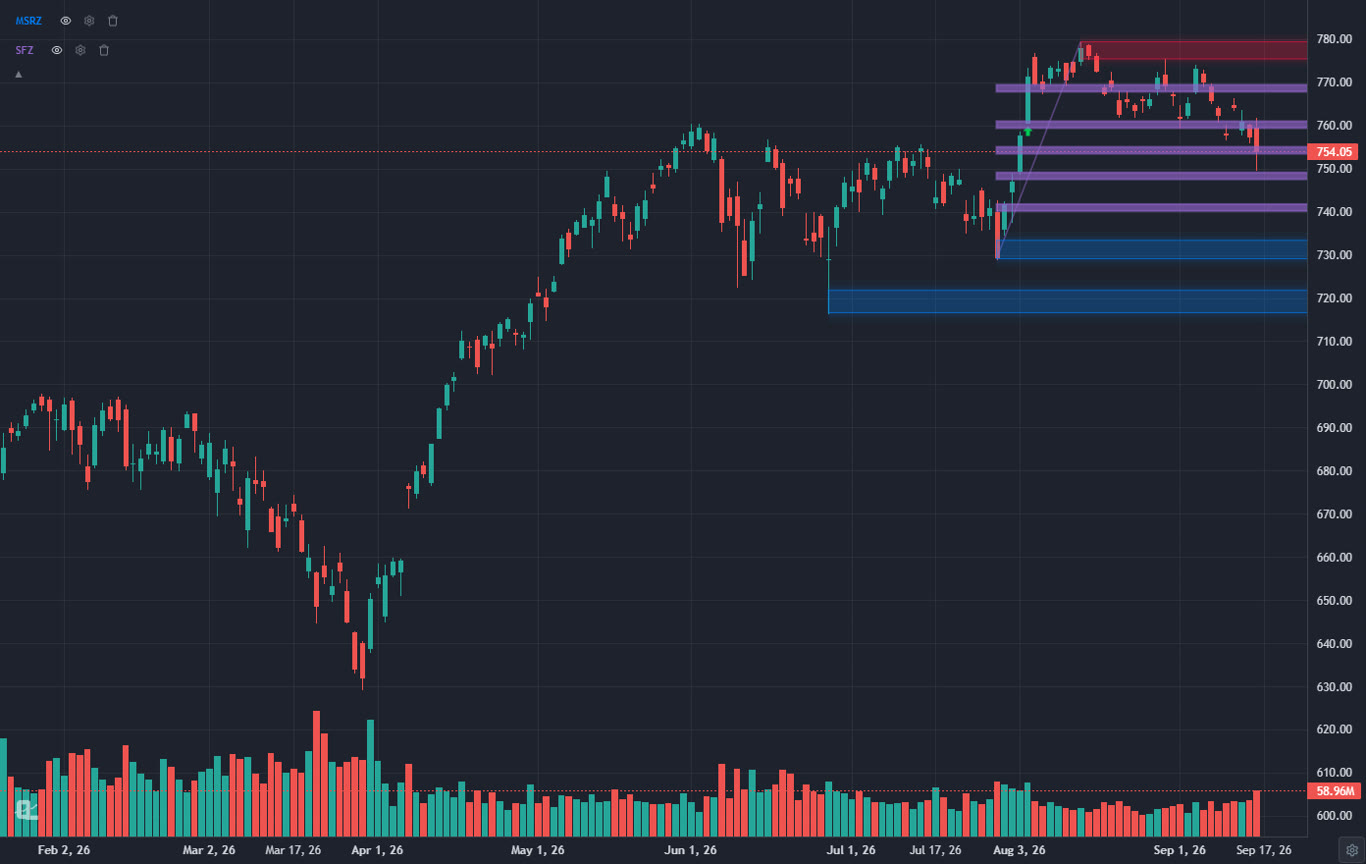
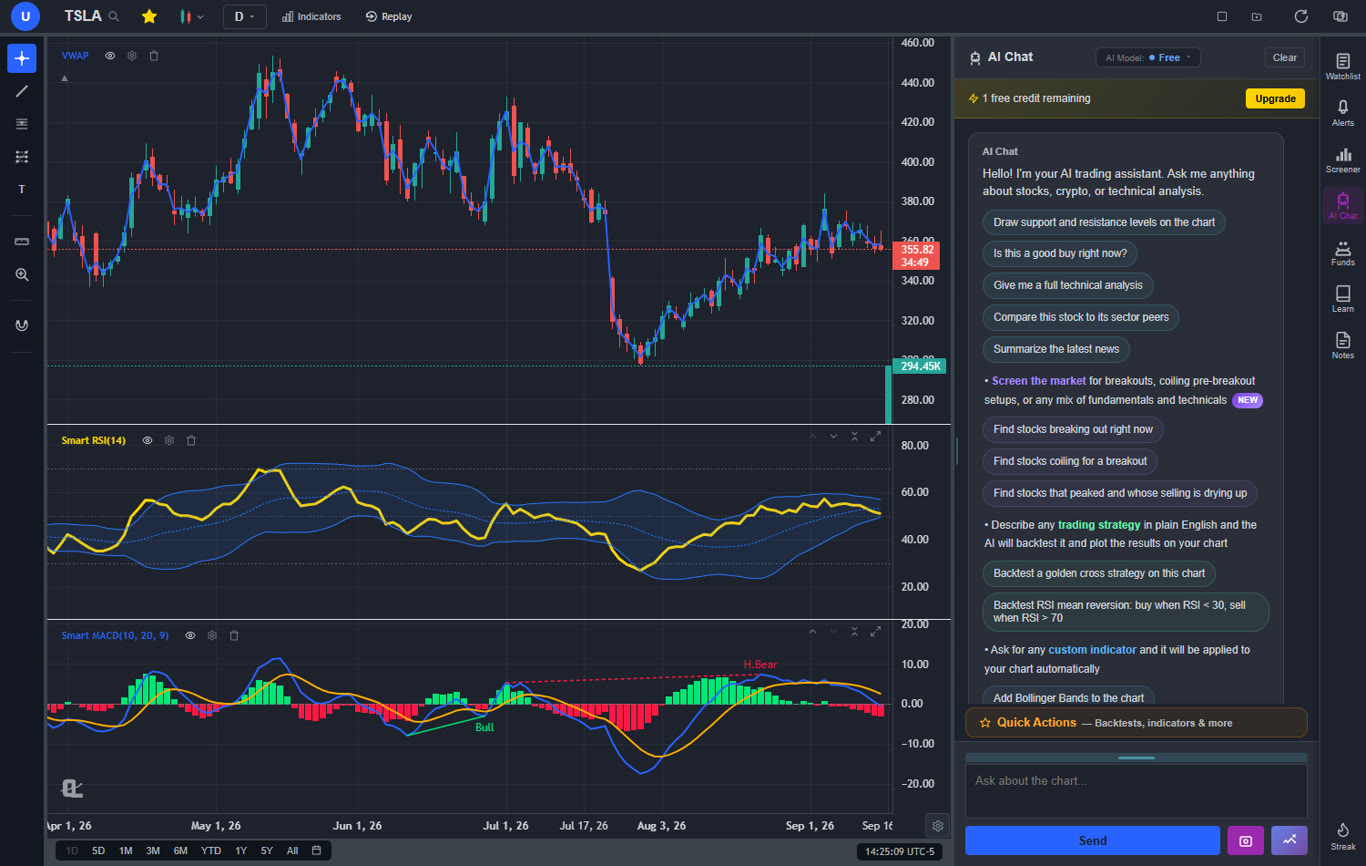
The platform's AI layer is its defining advantage over every competitor, including TradingView at any price. ChartingLens includes a conversational AI trading assistant that understands your chart and can act on it. Ask it for support and resistance levels and it identifies key price zones and draws them directly on your chart as color-coded lines — green for support, red for resistance. Ask it to identify trend direction, describe a pattern, or explain why a stock moved, and it responds with analysis grounded in the current chart data. This is not a generic chatbot; it is an assistant that sees what you see and works within your trading environment.
ChartingLens also generates AI buy and sell signals by scanning over 2,000 stocks daily using machine learning to identify high-probability setups. These signals appear directly on your charts. The platform's automated chart pattern recognition identifies head-and-shoulders, double tops, double bottoms, wedges, flags, triangles, and other classical formations automatically — no manual scanning required.
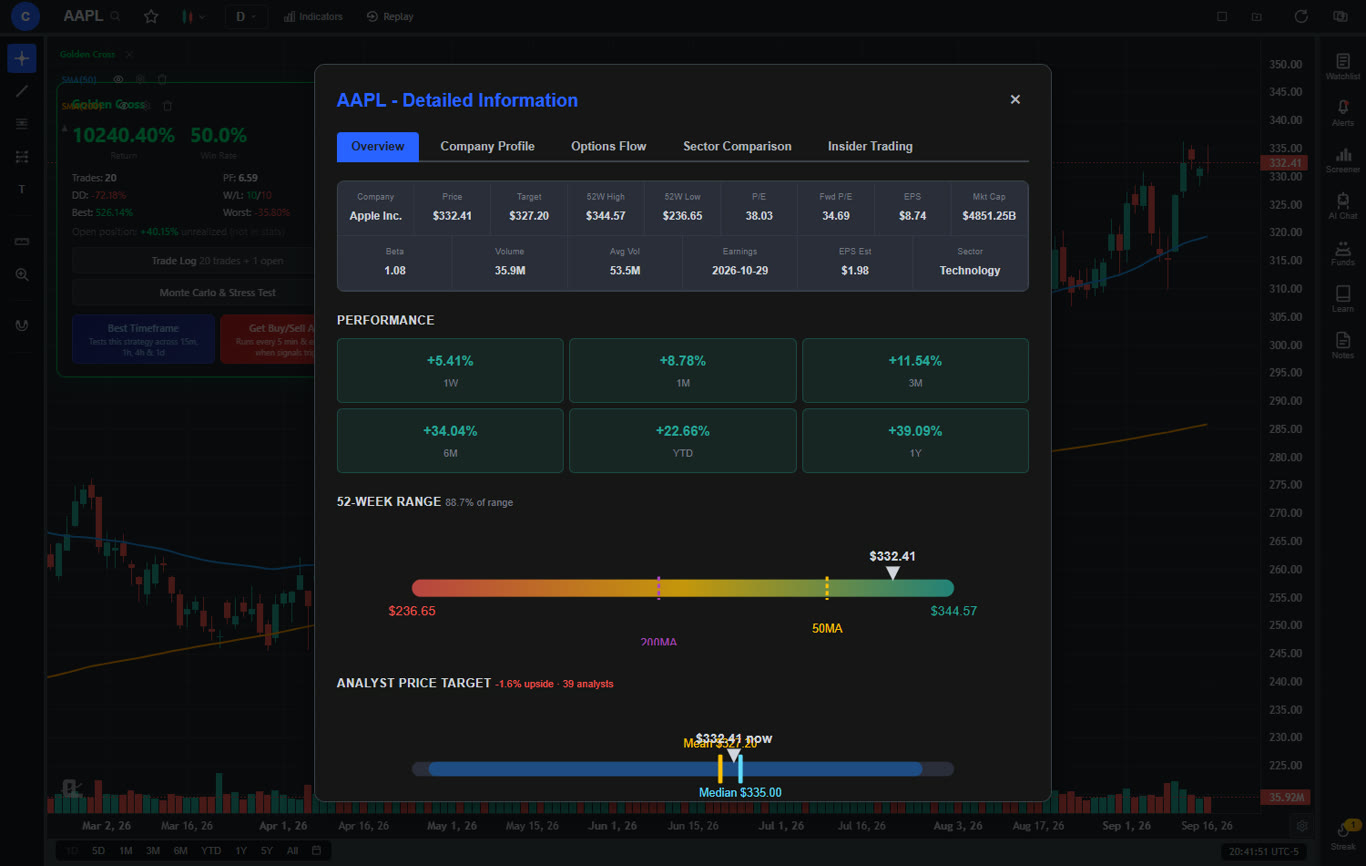
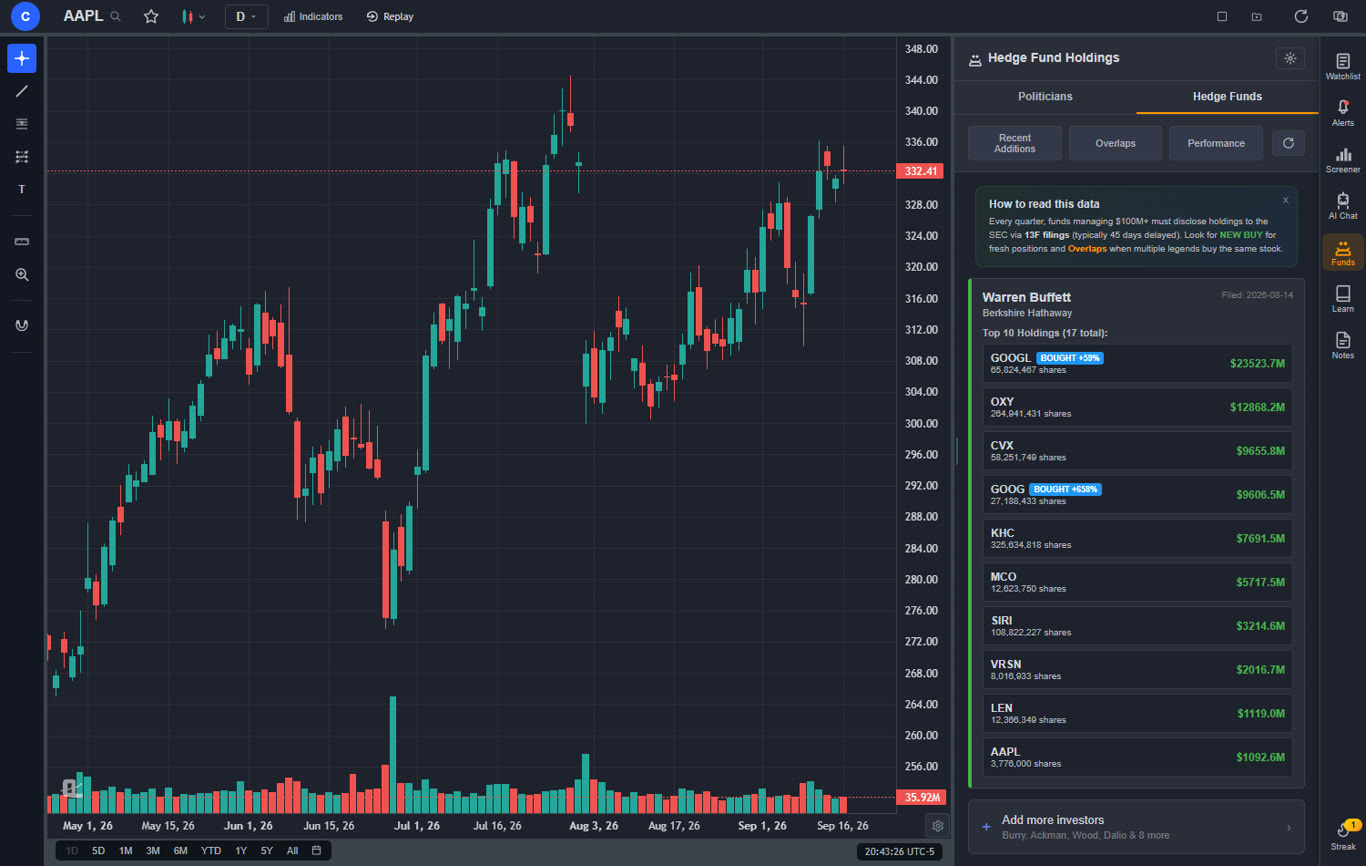
On the data intelligence side, ChartingLens integrates real-time insider trading data and hedge fund holdings, letting you see what corporate executives and legendary investors like Warren Buffett, Michael Burry, and David Tepper are actually buying and selling — all within the same interface where you do your chart analysis. The company fundamentals panel adds income statements, balance sheets, cash flow history, analyst price targets, buy/sell/hold ratings, institutional ownership data, and a dedicated Options Flow tab showing options activity by expiration date, strike, and put/call ratio. Most platforms charge separately for this level of data.
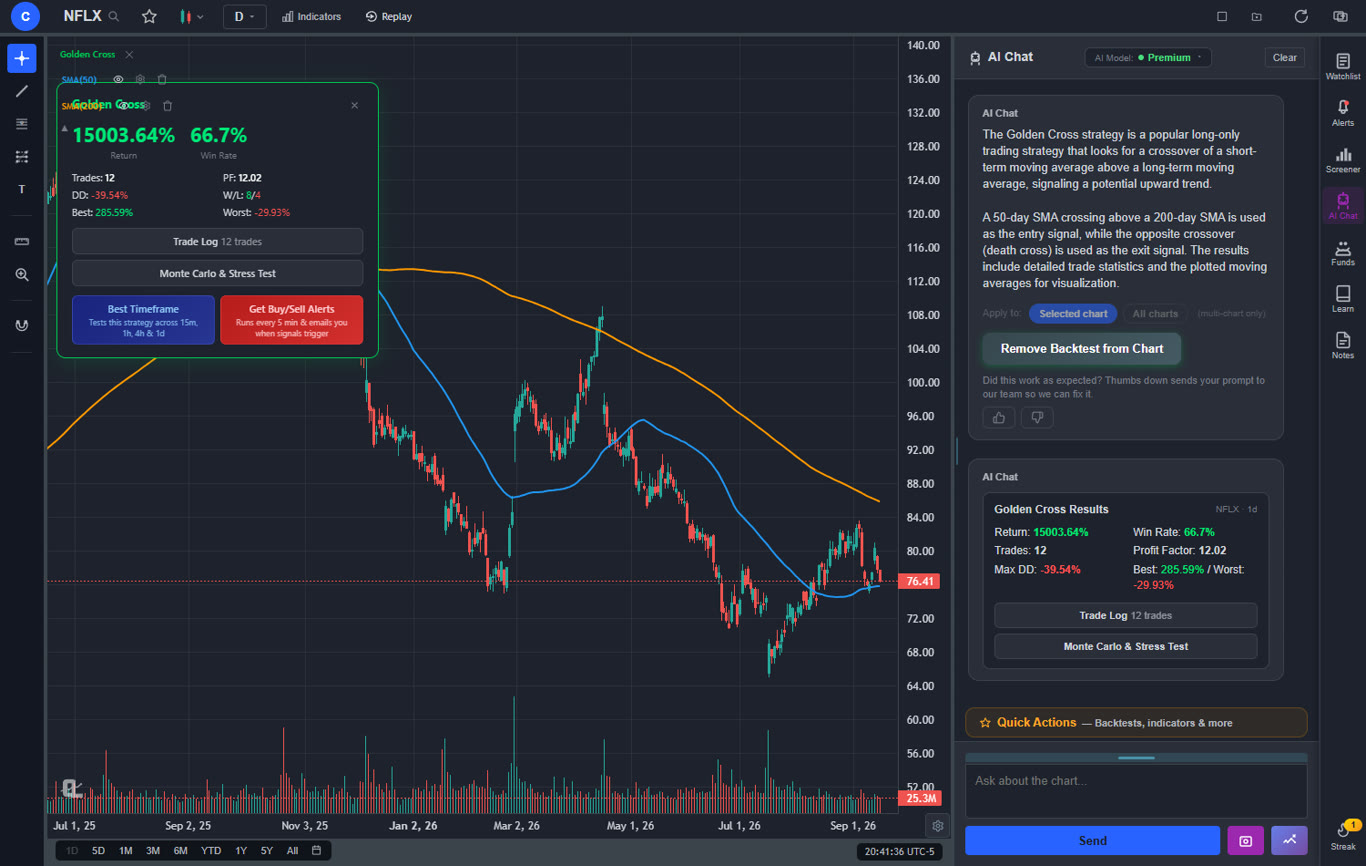
The AI strategy backtester is another feature TradingView simply does not have. Describe any trading strategy in plain English — including shorting strategies, time-based filters like "only trade on Tuesdays" or "only between 9am and 11am EST," or complex multi-condition setups — and the AI builds it, runs it against historical data, and plots every signal on your chart alongside an equity curve. Stats include total return, Sharpe ratio, win rate, profit factor, and max drawdown. The "Find Best Timeframe" feature runs your strategy across 15-minute, 1-hour, 4-hour, and daily candles and ranks them by performance. No coding required.
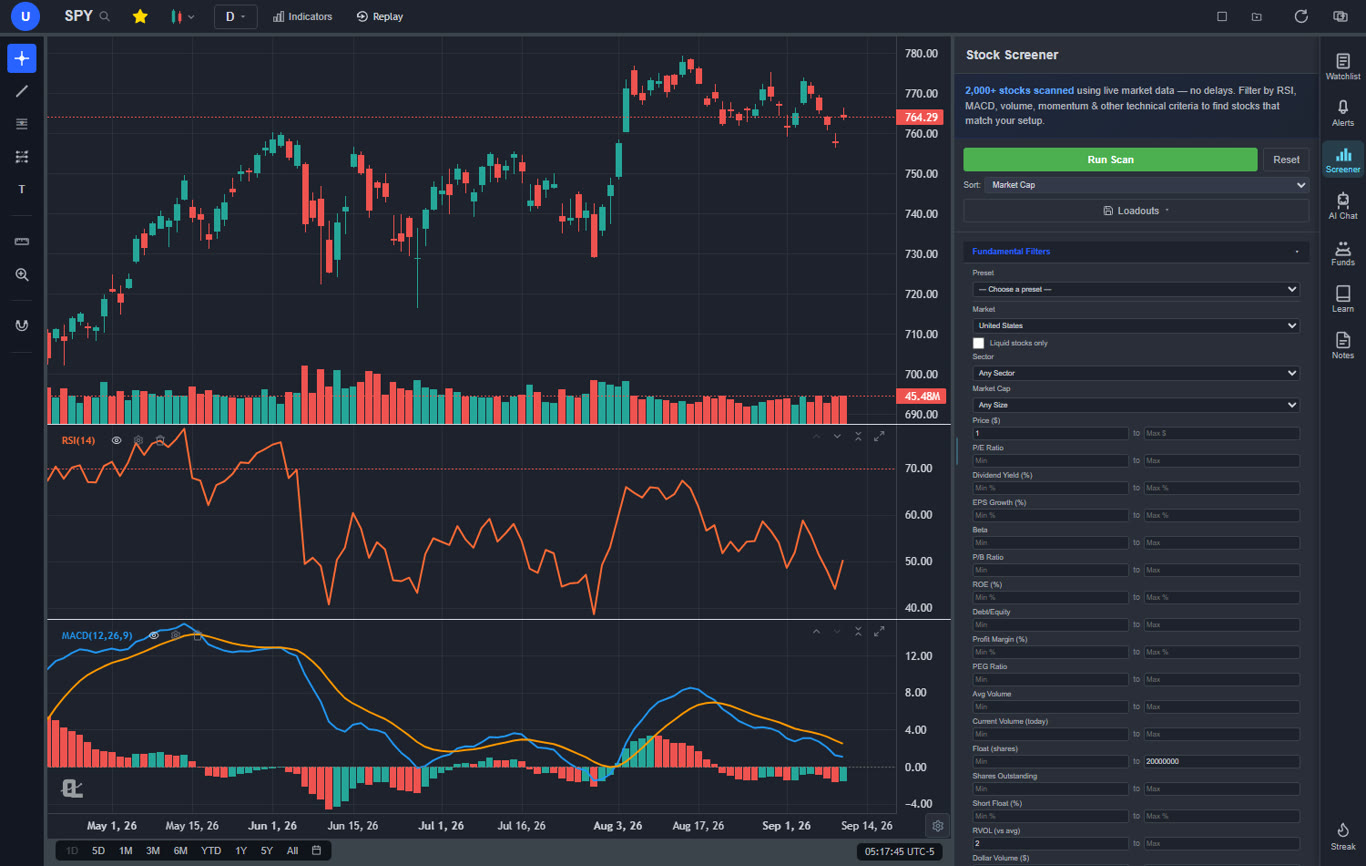
Additional features include Bar Replay for stepping through historical candles to practice reading price action, multi-chart layouts with up to three fully independent charts side by side, a server-side stock screener with 12 fundamental filters, and trendline alerts that trigger when price crosses a line you have drawn. Premium at $14.99 per month — less than TradingView's cheapest paid plan — unlocks Volume Profile (VRVP), deeper AI analysis, unlimited custom backtesting strategies, extended historical data, and trendline alerts.
Pros
Large built-in indicator library, free, unlimited per chart
AI buy/sell signals scanning 2,000+ stocks daily
AI assistant draws support/resistance directly on chart
Plain-English strategy backtester (no coding)
Auto chart pattern recognition
Real-time insider trading data and hedge fund holdings
Full company fundamentals panel with options flow
Real-time stock and crypto charts
Multi-chart layouts (up to 3 charts, 8 layout arrangements) + multi-window support
Bar Replay for practice and historical analysis
Volume Profile (VRVP) on Premium — institutional-grade price level analysis
Stock screener with 12 fundamental filters
No ads on any tier
Premium costs less than TradingView's Essential plan
Pine Script conversion — paste any Pine Script indicator and it becomes a live native indicator on your chart (Premium)
Stocks, ETFs, crypto, forex, metals, and index and commodity CFDs (US30, US500, NAS100, oil, gold) in one search bar
25 daily AI buy signals with a public, forward-tested track record and a trade plan (entry, stop, target) on every signal
Backtests include a Monte Carlo stress test and intrabar exits, built from a plain-English strategy description
Free interactive courses drawn on real charts, plus a notes and journal panel
Cons
No public script-sharing marketplace — existing Pine Script indicators come in through the paste-and-convert feature (Premium) instead
No built-in brokerage or order execution
Best for: Traders who want the most complete free charting experience — AI signals, plain-English backtesting, company fundamentals, options flow, pattern recognition, and insider data all in one platform without paying TradingView prices.
2. Barchart — Best Free Data Coverage for Multi-Market Traders
BarchartFree + from $19.99/mo
Barchart is the strongest free option for traders who need broad market data across asset classes. Its free tier includes over 150 technical indicators — more than TradingView's paid Plus plan — and covers stocks, ETFs, futures, forex, and commodities with real-time data on most markets. The unusual options activity feed surfaces contracts with above-average volume across the market, giving traders a real-time window into smart money positioning that TradingView does not offer natively at any tier.
Barchart's limitation is the absence of any intelligence layer. There are no AI features, no automated pattern recognition, no insider trading data, and no company fundamentals panel. The charting interface, while functional, does not match ChartingLens's modern design. Most traders who use Barchart pair it with ChartingLens: Barchart for futures data and options flow breadth, ChartingLens for AI signals, pattern recognition, and fundamental analysis. Together they cover more ground than TradingView does at any price point.
Pros
150+ indicators on the free tier
Covers stocks, ETFs, futures, forex, and commodities
Real-time data across most markets for free
Unusual options activity feed
No broker account required
Cons
No AI features, signals, or pattern recognition
No strategy backtesting
No insider trading data or fundamentals panel
Ads on free tier
Best for: Multi-market traders who need broad free data coverage including futures, forex, and options flow without a broker account.
3. Moomoo — Best for Free Level 2 Market Depth
MoomooFree with Brokerage Account
Moomoo's primary advantage is free Level 2 market depth data — bid and ask quotes showing full order book depth — included with a free brokerage account. Most platforms charge $15–$30 per month for Level 2 access. Moomoo includes it at no cost, which is a material value-add for active day traders whose entries and exits depend on reading order book dynamics. The platform offers approximately 50 indicators and a cleaner charting interface than most brokerage apps, with real-time data and commission-free trading for stocks and ETFs.
As an analysis platform, Moomoo is limited. There are no AI features, no automated pattern recognition, no strategy backtesting, and no company fundamentals panel beyond the basics. Most traders use Moomoo for Level 2 and trade execution, and ChartingLens for all analysis work — AI signals, pattern recognition, insider data, and fundamentals. That combination covers what TradingView offers on its paid plan at no cost.
Pros
Free Level 2 market depth data
~50 indicators with clean interface
Commission-free stock and ETF trading
Real-time data included free with account
Paper trading available
Cons
Brokerage account required
No AI features or automated pattern recognition
No strategy backtesting
Limited fundamentals data
Best for: Active day traders who need free Level 2 market depth and commission-free execution in one brokerage app.
4. Webull — Best Free Mobile Trading App
WebullFree
Webull combines commission-free stock trading with a polished mobile interface that includes basic charting built into the trading workflow. Free features include real-time market data, paper trading, fractional shares, and extended-hours access. About 10 technical indicators are available (RSI, MACD, Bollinger Bands, moving averages, volume), which is enough for casual chart checks but insufficient for serious multi-indicator analysis.
Webull is a trading app first and a charting tool second. For traders who want to check a chart, confirm an RSI reading, and place a trade without switching apps, Webull is convenient. For traders who want multiple stacked indicators, AI signals, pattern recognition, or strategy testing, Webull does not serve those needs. Many Webull users analyze in ChartingLens and execute in Webull — getting the free AI intelligence layer that Webull lacks while keeping the commission-free execution they value.
Pros
Commission-free stock, ETF, and options trading
Clean, intuitive mobile experience
Free real-time market data
Paper trading and fractional shares
Extended-hours trading
Cons
Only ~10 indicators
Basic drawing tools
No AI features, scripting, or insider data
Charting secondary to brokerage
Best for: Mobile-first traders who want commission-free stock trading with basic charting in a single app.
5. TradeStation — Best for Algorithmic and Automated Traders
TradeStationFrom $99.95/mo platform fee
TradeStation is built around EasyLanguage, a proprietary scripting language designed for coding, backtesting, and automating trading strategies. It is the closest thing to a TradingView Pine Script equivalent in terms of systematic strategy development — and in some ways more powerful, since strategies can be deployed for live automated execution through the integrated broker. The historical data depth and backtesting engine are excellent. The EasyLanguage community has produced thousands of strategy scripts over decades.
The platform fee of $99.95 per month is waivable with sufficient trading activity, but for part-time or swing traders, it is an expensive commitment. The interface is dated and EasyLanguage has a learning curve. There are no AI features, no plain-English backtesting, and no company fundamentals. For traders who want to test strategy concepts without coding, ChartingLens's AI backtester covers the idea validation phase. TradeStation is the next step: production automation with live broker integration for traders who code their own systems.
Pros
EasyLanguage for building automated strategies
Deep historical data for backtesting
Full broker integration and automated order routing
Large community of published EasyLanguage scripts
Cons
$99.95/mo platform fee unless trading thresholds are met
Dated, complex interface
EasyLanguage has a real learning curve
No AI features or fundamentals panel
Best for: Quantitative traders who code systematic strategies and need automated broker-integrated execution.
6. Interactive Brokers — Best for Global Market Access
Interactive Brokers (IBKR)Free with Account
Interactive Brokers is the preferred execution platform for traders who need access to global markets at the lowest margin rates available to retail traders. Trader Workstation (TWS) is free with an account and covers trading in 150+ countries across stocks, options, futures, forex, bonds, and funds. The margin rates IBKR offers are significantly below most retail brokers, making it the default choice for traders who use leverage regularly.
The charting in TWS is functional but not the platform's strength. The interface is complex, indicator selection is limited, and there are no AI features. Most professional IBKR users pair it with a dedicated analysis platform. ChartingLens for charting, AI signals, fundamentals, and insider data — then IBKR for execution where the routing quality and margin rates matter. This combination covers both ends of the workflow at low cost.
Pros
Access to 150+ countries and all major asset classes
Lowest retail margin rates available
Professional-grade order types and routing
Free Trader Workstation with account
Cons
Very complex interface, steep learning curve
Limited charting capability
No AI features or pattern recognition
Requires opening a brokerage account
Best for: Professional and international traders who prioritize global market access, low margin rates, and professional-grade execution.
7. StockCharts — Best for Classical Technical Analysis
StockChartsFree (basic) + from $24.95/mo
StockCharts has been a technical analysis institution for over two decades. Its ChartSchool educational library teaches TA concepts from beginner to advanced, and the platform supports chart types that most modern tools have abandoned — point-and-figure, Renko, Kagi, and three-line break. For traders who study classical technical analysis methodology, StockCharts offers both educational depth and specialized charting tools that match it.
The free tier is limited to delayed data with restricted indicator access. Real-time data and full scanning tools require the paid plan starting at $24.95 per month, which is more expensive than ChartingLens's premium tier despite offering no AI features, no insider data, and a significantly older interface. StockCharts earns its place for education-focused traders, but as a daily charting platform in 2026, it has been surpassed in value by more modern alternatives.
Pros
Exceptional TA education through ChartSchool
Specialized chart types (P&F, Renko, Kagi)
Strong scanning tools on paid plans
Long-established, trusted platform
Cons
Free tier is delayed data only
Paid plans start at $24.95/mo — more than ChartingLens premium
No AI features, insider data, or pattern recognition
Interface feels outdated compared to modern platforms
Best for: Technical analysis students and traders who prioritize classical charting education and specialized chart types.
8. Yahoo Finance — Best for Free News and Price Checks
Yahoo FinanceFree (+ Yahoo Finance Plus from $24.99/mo)
Yahoo Finance is best understood as a financial news and portfolio tracking site that happens to have basic charts. The free product covers stock quotes, earnings calendars, financial news, analyst estimates, and portfolio watchlists — and for those functions it is excellent. Millions of traders bookmark it for news and earnings data. The charting layer includes a handful of indicators (moving averages, RSI, MACD, Bollinger Bands) and basic candlestick charts, but no drawing tools, no trendlines, no Fibonacci retracements, and delayed free-tier data with heavy advertising throughout.
Yahoo Finance is not a serious TradingView alternative for chart analysis, but it is a useful news complement to a dedicated platform. Most traders keep it open for earnings dates, headline monitoring, and quick portfolio checks while doing actual chart work in ChartingLens.
Pros
No account required for basic access
Comprehensive financial news and earnings coverage
Portfolio tracking and watchlists
Widely trusted and easy to use
Cons
Minimal charting tools, no drawing tools
Delayed data on free tier
Heavy advertising throughout
No AI features, insider data, or scripting
Best for: Casual investors who want to follow financial news, check earnings calendars, and monitor portfolio performance.
How to Choose the Right Platform in 2026
The right TradingView alternative depends on your trading style, the data you need, and how much you are willing to pay. Here is a framework for making the decision.
How Many Indicators Do You Use?
If you routinely stack 3 or more indicators per chart, TradingView's free tier is immediately unusable. ChartingLens offers 15+ with no per-chart limit for free.
Do You Need AI Features?
TradingView has zero native AI features. If AI signals, an AI assistant, or plain-English backtesting matters to your workflow, you need ChartingLens.
Do You Track Smart Money?
Insider trading data and hedge fund holdings are available on ChartingLens for free. TradingView offers neither. This is a hard differentiator.
Do You Need to Execute Trades?
Moomoo, Webull, IBKR, and TradeStation include brokerage services. ChartingLens is analysis-only — pair it with your preferred broker for execution.
Do You Code Custom Indicators?
TradingView's Pine Script ecosystem is its strongest moat. If you have years of custom Pine Script work, switching carries real switching costs. TradeStation's EasyLanguage is the closest alternative for automation.
What Is Your Budget?
ChartingLens free tier covers most traders' needs. Its $14.99/mo premium is less than TradingView's cheapest paid plan. If budget is a concern, the math heavily favors switching.
Frequently Asked Questions
TradingView is worth paying for if Pine Script or the social Ideas community is central to your trading workflow. For traders who rely on community indicators, publish analysis, or follow other traders' setups, TradingView's ecosystem still has value. For everyone else — traders who want clean charts, multiple indicators, strategy testing, and modern AI-driven tools — TradingView is no longer the best value. Platforms like ChartingLens offer more on their free tier than TradingView's paid Essential plan, at a fraction of the cost.
ChartingLens is the best TradingView alternative in 2026. It offers 40+ native indicators on its free tier with no per-chart limit — including the Master Pattern Suite (Elliott Waves, Harmonics, Chart Patterns, S/R Zones, Market Structure Pro) — AI Buy Signals across roughly 2,000 stocks, an AI Chat assistant that can draw on your chart, plain-English strategy backtesting, automated chart pattern recognition, real-time insider trading data, hedge fund holdings, Bar Replay, and a full company fundamentals panel with options flow — all on the free tier with no credit card and no ads. As of May 2026, Premium is $14.99/mo ($149/yr) and the new Pro tier is $29.99/mo ($299/yr) with unlimited everything.
TradingView's free tier allows only 1 indicator per chart, 1 alert, and 1 chart layout, with ads displayed throughout. The Essential plan is $14.95/month (2 indicators, 20 alerts). The Plus plan is $29.95/month (5 indicators, 100 alerts). The Premium plan is $59.95/month (25 indicators, 400 alerts, 8 layouts). Annual billing reduces these prices by roughly 40%. By comparison, ChartingLens gives you a large indicator library, AI signals, and no ads on the free tier, with a premium plan at $14.99/mo.
TradingView's free plan includes 1 technical indicator per chart, 1 active alert, 1 saved chart layout, basic drawing tools, and access to the social community and Ideas feed. It shows ads throughout the interface. There are no AI features, no automated pattern recognition, and no company fundamentals panel on any TradingView tier. For most active traders, the 1-indicator-per-chart restriction alone makes the free tier unusable for serious analysis.
ChartingLens offers several features TradingView does not offer at any price tier: an AI trading assistant that draws support and resistance lines directly on your chart, daily AI buy/sell signals from scanning 2,000+ stocks, a plain-English strategy backtester requiring no coding, automated chart pattern recognition, real-time insider trading data, hedge fund holdings (Buffett, Burry, Tepper, etc.), and a full company fundamentals panel with options flow — all available free with no ads. TradingView's advantage is its Pine Script ecosystem and social community, neither of which ChartingLens replicates.
Yes. ChartingLens includes a free AI strategy backtester that requires no coding at all. Describe your strategy in plain English — including shorting logic, time-based filters, or multi-condition rules — and the AI builds it, runs it on historical data, and plots every signal on your chart. Performance stats include total return, Sharpe ratio, win rate, profit factor, and max drawdown. A "Find Best Timeframe" feature automatically tests your strategy across 15-minute, 1-hour, 4-hour, and daily candles and ranks them by a composite performance score. Free users get two preset strategies; premium users at $14.99/mo get unlimited custom strategies.
TradingView does not offer any native AI trading features. There are no built-in AI buy/sell signals, no AI assistant, and no automated chart pattern recognition on any TradingView plan. Pine Script allows users to code custom indicators and strategies, but this is scripting rather than AI — it requires programming knowledge and produces rule-based outputs rather than machine learning-driven analysis. ChartingLens is the platform with the most comprehensive AI trading feature set in 2026: daily AI signals scanning 2,000+ stocks, a conversational AI assistant that can draw on your chart, and a plain-English backtester — all on the free tier.
Verdict: TradingView vs. Alternatives in 2026
TradingView is not a bad platform. For traders who have built deeply into Pine Script or rely on its social community, it remains the best choice in those specific areas. The charting fundamentals are solid, the asset coverage is broad, and the interface is polished. If those things describe your workflow, TradingView's paid plan may still be justified.
But for the majority of retail traders — those who want to analyze charts with multiple indicators, test trading strategies, track institutional activity, and leverage AI to surface better setups — TradingView has been surpassed. Its free tier is the most restrictive of any major charting platform. Its paid plans are among the most expensive. And its feature set has stood still while competitors built AI layers that genuinely change how analysis is done.
ChartingLens stands out as the strongest overall alternative in 2026 because it collapses what used to require multiple paid tools into a single free interface. Charting, AI signals, pattern recognition, strategy backtesting, insider tracking, company fundamentals, and options flow — all in one platform, all on the free tier, all without the price tag that TradingView demands for a fraction of those features. For traders who want to make better decisions and spend less on the tools that help them do it, the switch is straightforward.
Get AI signals, plain-English strategy backtesting, company fundamentals, options flow, insider data, hedge fund holdings, and real-time charts. No credit card required.