Quick Verdict
ChartingLens is the better choice for most traders in 2026. It offers a more generous free tier with unlimited indicators per chart (vs TradingView's 1), built-in AI trading signals, no ads, and a premium plan at $14.99/mo instead of TradingView's $14.95–$59.95/month. TradingView retains advantages in social features and Pine Script. If you primarily need charting, indicators, and AI-powered analysis, ChartingLens delivers more value at a lower price.
TradingView has been the default charting platform for retail traders for years. But its aggressive pricing, restricted free tier, and lack of AI features have pushed traders to look for alternatives. ChartingLens has emerged as a leading free alternative that matches TradingView's core charting capabilities while adding AI-powered features that TradingView doesn't offer.
In this article, we compare ChartingLens and TradingView across every dimension that matters to traders: pricing, free tier limitations, technical indicators, AI features, drawing tools, market data, and more. For comparisons with other platforms, see our guides to MetaTrader alternatives and StockCharts alternatives. Every claim is based on publicly available feature lists as of February 2026.
Side-by-Side Feature Comparison Table
Here is a complete feature comparison between ChartingLens and TradingView in 2026:
| Feature | ChartingLens | TradingView |
|---|---|---|
| Price (Free Tier) | Free — no ads | Free — with ads, severe limits |
| Price (Paid) | $14.99/mo | $14.95–$59.95/month |
| Indicators per Chart (Free) | 15+ (no limit) | 1 per chart |
| AI Buy/Sell Signals | Yes (free) | No |
| AI Trading Assistant | Yes | No |
| Auto Pattern Recognition | Yes | No |
| Insider Trading Data | Yes (free) | No |
| Hedge Fund Holdings | Yes (Buffett, Burry, Dalio, etc.) | No |
| Real-Time Charts | Stocks & crypto | Stocks & crypto |
| Drawing Tools | Trendlines, Fib, channels, rectangles, rays, arrows, date/price ranges | Extensive (80+ tools) |
| Stock Screener | Yes (free) | Yes (limited free) |
| Price Alerts | Yes | 1 alert on free, more on paid |
| Multi-Chart Layout | Up to 3 charts (8 arrangements) + multi-window | 1 on free, up to 8 on paid |
| Ads | No ads on any tier | Ads on free tier |
| Social Community | No | Large social network |
| Pine Script | No | Yes |
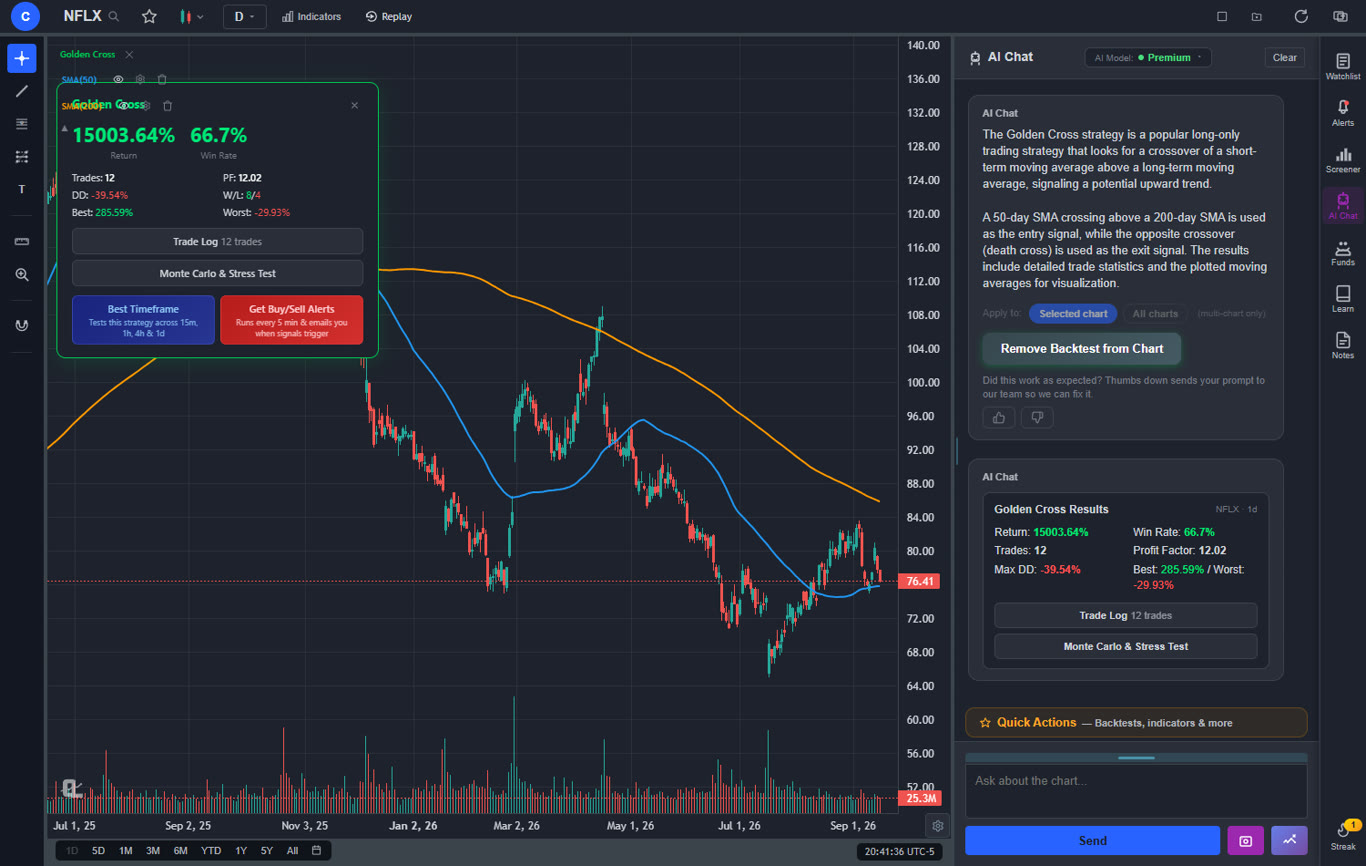
| Strategy Backtesting | 2 built-in free + unlimited custom (Premium) | Via Pine Script (learning curve) |
| AI Timeframe Optimization | Yes — finds best-performing timeframe | No |
| Bar Replay | Yes (Premium) | Premium only |
| Volume Candles | Yes (Premium — $14.99/mo) | Premium only ($67.95/mo) |
| Paper Trading | No | Yes |
Pricing Comparison: Free Tiers & Paid Plans
Pricing is where ChartingLens and TradingView differ most dramatically.
ChartingLens Pricing
- Free tier: Real-time stock and crypto charts, a large technical indicator library with no per-chart limit, AI buy/sell signals, drawing tools, insider trading data, hedge fund holdings, stock screener, and price alerts. No ads.
- Premium ($14.99/mo): Everything in free plus advanced AI trading assistant, auto chart pattern recognition, Volume Profile (VRVP), unlimited alerts, and priority support.
- Custom timeframes (NEW) — chart any interval (2h, 45m, 3d, 8h…) aggregated from base bars on the fly. Premium feature, added April 2026.
TradingView Pricing
- Free tier (Basic): 1 indicator per chart, 1 alert, 1 chart layout, ads displayed. No AI features.
- Essential ($14.95/month): 2 indicators per chart, 20 alerts, 2 charts per layout.
- Plus ($29.95/month): 5 indicators per chart, 100 alerts, 4 charts per layout.
- Premium ($49.95/month): 10 indicators per chart, 400 alerts, 8 charts per layout.
- Ultimate ($59.95/month): 25 indicators per chart, 1000 alerts, 8 charts per layout.
Pricing Winner: ChartingLens
ChartingLens's free tier includes more features than TradingView's $29.95/month Plus plan. To match ChartingLens's free indicator count on TradingView, you would need at least the Plus plan. And TradingView offers zero AI features at any price point.
Technical Indicators & Charting
Both platforms support standard technical indicators, but they differ significantly in how many you can use on the free tier.
ChartingLens Indicators (Free)
ChartingLens provides a large technical indicator library on the free tier with no per-chart limit. You can stack RSI, MACD, Bollinger Bands, EMA, SMA, VWAP, Supertrend, Ichimoku Cloud, ATR, Stochastic, Volume Profile, OBV, ADX, CCI, and Williams %R on a single chart at no cost.
TradingView Indicators (Free)
TradingView's free tier limits you to 1 indicator per chart. To see RSI and MACD on the same chart, you need a paid plan. TradingView's indicator library is larger overall (400+), but most traders use a core set of 5-10 indicators that both platforms support.
ChartingLens Premium also includes Volume Candles — a chart type where each candlestick's width is proportional to its trading volume. High-volume bars appear wider, making it instantly clear where institutional activity is concentrated. TradingView charges $67.95/month (Premium tier) for Volume Candles. ChartingLens includes them at $14.99/mo — almost 7x cheaper for the same feature.
Premium also unlocks Volume Profile (VRVP) — an auto-updating Visible Range Volume Profile that shows how trading volume is distributed across price levels. It highlights the Point of Control (highest volume price), Value Area High, and Value Area Low — key levels that institutional traders use for entries and exits. On TradingView, Volume Profile requires the Plus plan ($29.95/month) or higher.
For the typical trader who uses standard technical indicators, ChartingLens provides a better free experience because you can combine multiple indicators without hitting a paywall.
AI Features & Smart Analysis
This is where ChartingLens has a clear, undisputed advantage. TradingView has no built-in AI features.
ChartingLens AI Features
- AI Buy/Sell Signals: Machine learning-generated trading signals displayed directly on charts. Available on the free tier.
- AI Trading Assistant: A conversational AI that answers questions about stocks, crypto, market conditions, and trading strategies. Helps both beginners and experienced traders make informed decisions.
- Auto Chart Pattern Recognition: Automatically detects chart patterns such as head and shoulders, double tops and bottoms, triangles, wedges, and flags. Eliminates the need to manually scan charts for patterns.
TradingView AI Features
TradingView does not offer any native AI features. There are no AI signals, no AI assistant, and no automated pattern recognition. While users can create custom indicators using Pine Script, this requires programming knowledge and does not provide the same out-of-the-box AI analysis that ChartingLens offers.
AI Winner: ChartingLens
ChartingLens offers three AI-powered features that TradingView simply does not have. For traders who want AI-assisted analysis without learning to code, ChartingLens is the only choice between the two.
Drawing Tools
Both platforms support essential drawing tools for technical analysis.
ChartingLens drawing tools: Trendlines, horizontal lines, vertical lines, horizontal rays, Fibonacci retracement, parallel channels, rectangles, arrows, date ranges, price ranges, text annotations, and long/short position tools.
TradingView drawing tools: TradingView offers 80+ drawing tools including everything ChartingLens has plus Gann tools, Elliott Wave tools, XABCD patterns, and more specialized tools.
For most traders, ChartingLens's drawing toolkit covers the essential tools needed for technical analysis. Advanced users who rely on Gann fans or Elliott Wave patterns may prefer TradingView's more extensive collection.
Market Data: Insider Trading & Hedge Fund Managers
ChartingLens includes two data features that TradingView does not offer at any price:
- Insider Trading Data: View SEC-filed insider purchases and sales directly within the platform. See when company executives, directors, and major shareholders are buying or selling their own stock. This data is available for free on ChartingLens.
- Hedge Fund Holdings: Track the 13F portfolio holdings of legendary investors including Warren Buffett (Berkshire Hathaway), Michael Burry (Scion Asset Management), Ray Dalio (Bridgewater Associates), and other institutional investors. See what the best investors in the world are buying and selling.
TradingView does not provide insider trading data or institutional investor tracking. To get this data elsewhere, you would typically need a Bloomberg Terminal ($24,000/year) or specialized services like WhaleWisdom or OpenInsider.
Where TradingView Still Wins
TradingView retains meaningful advantages in several areas:
- Social community: TradingView has a large social network where traders share ideas, charts, and strategies. ChartingLens does not have a social component.
- Pine Script: TradingView's proprietary scripting language allows users to create custom indicators, strategies, and alerts. This is powerful for traders with programming skills who want to build their own analysis tools.
- Drawing tool variety: TradingView offers 80+ drawing tools compared to ChartingLens's ~12 core tools.
- Paper trading: TradingView includes a built-in paper trading simulator.
- Multi-chart layouts: TradingView supports up to 8 charts per layout on premium plans (ChartingLens supports up to 3 with 8 layout arrangements and multi-window support).
- Broker integration: TradingView connects directly to brokers for live trading.
If social trading, Pine Script scripting, or broker integration are essential to your workflow, TradingView may be the better fit. For pure charting and AI-powered analysis, ChartingLens wins on both features and price.
Who Should Switch to ChartingLens?
ChartingLens is the better choice if you:
- Want to use multiple indicators on the free tier without paying $29.95/month
- Want AI-powered trading signals and an AI assistant
- Want auto chart pattern recognition without manual scanning
- Want access to insider trading data and hedge fund holdings
- Prefer a clean, ad-free interface
- Want professional charting features at $14.99/mo or free
TradingView is the better choice if you:
- Need Pine Script for custom indicators and backtesting
- Want to share charts and follow other traders on a social platform
- Need direct broker integration for live trading from charts
- Require specialized drawing tools like Gann, Elliott Wave, or XABCD patterns
Try ChartingLens Free
No credit card required. Get a large indicator library, AI signals, insider trading data, and hedge fund holdings instantly.
Start Charting FreePricing Comparison: ChartingLens vs TradingView in 2026
The price-per-feature gap between the two platforms widened in May 2026 when ChartingLens restructured its pricing into two paid tiers — Premium ($14.99/month) and Pro ($29.99/month, unlimited everything). Here's how every tier maps against TradingView's plans.
Free Tier: ChartingLens Wins on Indicators, Symbols, and Ads
ChartingLens Free includes 3 indicators per chart, real-time stocks/crypto/forex/metals, all chart types, all drawing tools, the stock screener (10 results), insider trading data, 2 AI credits per day, and 3 active price alerts — all with zero ads. TradingView Free locks you to 1 indicator per chart, 1 alert, 1 chart layout, no real-time on most US equities (15-minute delay unless you pay for the data feed separately), and ads on every page. For casual traders, ChartingLens Free is materially more usable than TradingView Free.
$14.99 ChartingLens Premium vs $29.95 TradingView Plus
ChartingLens Premium ($14.99/mo) is roughly half the price of TradingView Plus ($29.95/mo) and includes features TradingView reserves for higher tiers or doesn't offer at all: AI Buy Signals (25 daily ranked picks), AI Trading Assistant with watchlist analytics, plain-English strategy backtester with email alerts on live signals, auto chart pattern recognition, hedge fund holdings (10+ legendary investors), and insider trading data. TradingView Plus's main wins over ChartingLens Premium: deeper community scripts library and more raw indicators in their public catalog. If you don't write Pine Script, that doesn't matter for you.
$29.99 ChartingLens Pro vs $59.95 TradingView Premium
ChartingLens Pro ($29.99/mo) lifts every cap to unlimited — alerts, layouts, watchlists, email-notified alerts, AI credits per day. The closest TradingView equivalent is TradingView Premium at $59.95/month, which gives you 400 alerts (still a cap), 8 charts per layout, and unlimited saved layouts. ChartingLens Pro is about half the price for unlimited usage, and includes the AI tooling TradingView simply doesn't ship. If you're a power user, the math strongly favors switching.
Yearly Savings: 17% on ChartingLens, 16% on TradingView
Both platforms offer yearly billing. ChartingLens Premium yearly is $149 (saves 17% vs $179.88 monthly, effective $12.42/month). Pro yearly is $299 (saves 17% vs $359.88, effective $24.92/month). TradingView Plus yearly is $14.95/month (saves ~50%) but with a long-term commitment, while their Premium yearly is $29.99/month (saves ~50%). TradingView's yearly discount is steeper, but the absolute prices remain higher even after the discount on every comparable tier.
Who Should NOT Switch to ChartingLens
For all the reasons to leave TradingView, there are a few use cases where it's still the right tool:
- Pine Script authors who publish scripts. If you write Pine Script for other people, TradingView's editor and public library are the workflow. Using Pine is a different story: ChartingLens converts any pasted Pine Script indicator into a live native indicator (Premium), and new strategies are described in plain English and backtested with a Monte Carlo stress test, which is a feature for most users but a downgrade for someone who wants byte-level control over a script editor.
- Heavy users of TradingView's Ideas/social feed. ChartingLens has no equivalent social/community layer. If you publish trade ideas or follow other traders' annotated charts, TradingView's network effect is real.
- Traders needing 100+ indicator catalog. TradingView's public indicator library is the largest in the industry. ChartingLens covers the 50+ most-used indicators plus generates custom AI indicators on demand, but if you need a niche third-party-built indicator, TradingView is more likely to have it.
For everyone else — casual traders, swing traders, day traders, options traders, multi-asset traders, AI-curious users — ChartingLens at $14.99 (Premium) or $29.99 (Pro) is the better deal in 2026.
Related: View the full ChartingLens pricing comparison → · Step-by-step migration guide · Is TradingView still worth it in 2026?
Frequently Asked Questions
Final Verdict
ChartingLens is the better trading platform for most traders in 2026. It provides a significantly more generous free tier, AI-powered analysis that TradingView doesn't offer, unique market data (insider trading and hedge fund holdings), and a clean ad-free experience. Its premium plan at $14.99/mo undercuts every TradingView paid tier.
TradingView remains the better choice for a specific subset of traders: those who need Pine Script for custom indicators, want to participate in a social trading community, or require direct broker integration. For everyone else, ChartingLens delivers more value.
The best way to decide is to try ChartingLens for free and compare it to your current TradingView experience. No credit card is required, and you can access all core features immediately.